Scale from Zero to Millions of Users
7 min read- What it is: the journey from one server to millions of users, layer by layer
- Order matters: web tier first (LB, stateless), then data tier (replication, cache, CDN), then scale (sharding, multi-DC)
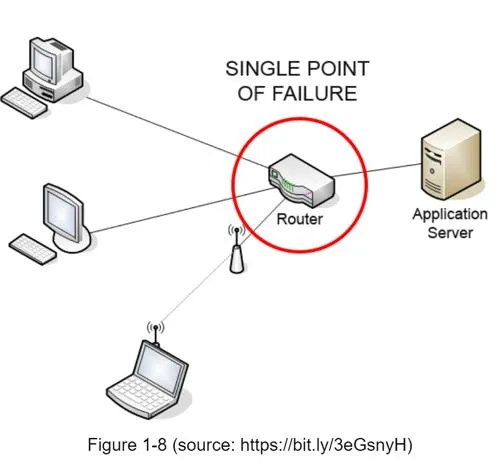
- Golden rule: build redundancy at every tier: no single point of failure
- Final state: stateless web tier + sharded DB + CDN + message queue + automation
Scaling from a single server to millions of users requires continuous refinement through multiple architectural layers.
Phase 1 of 4. Start: single server + database
Single server setup
Everything runs on one server: web app, database, cache, etc.
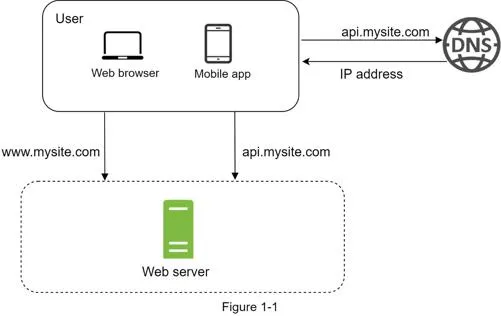
Request flow:
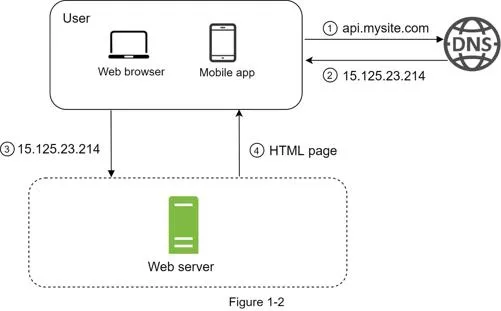
- Users access via domain names (DNS, usually a 3rd-party service)
- DNS returns the IP address to the browser/mobile app
- HTTP requests sent directly to the web server
- Web server returns HTML/JSON
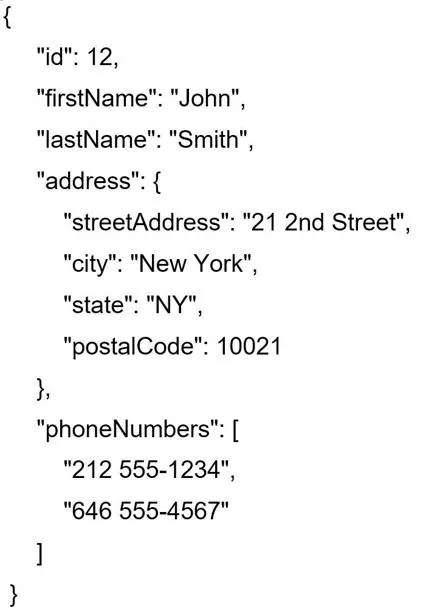
Traffic sources: web applications (server-side languages + client-side HTML/JS) and mobile applications (HTTP + JSON). Example: GET /users/12 returns a JSON user object.
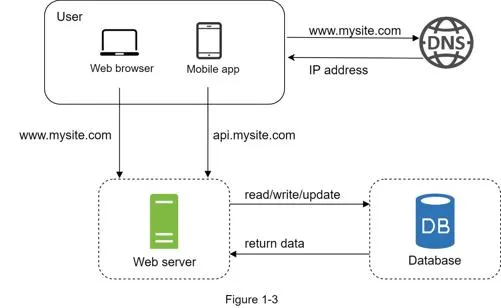
Database
With growth, separate the web tier from the data tier so each can scale independently.
- Relational (SQL): MySQL, Oracle, PostgreSQL: data in tables/rows, supports JOINs
- Non-relational (NoSQL): CouchDB, Neo4j, Cassandra, HBase, DynamoDB (four categories: key-value, graph, column, document stores); no JOINs
Choose NoSQL when: super-low latency needed, unstructured data, only serialization needed (JSON/XML/YAML), or massive data storage.
Phase 2 of 4: Scale the web tier
Vertical vs horizontal scaling
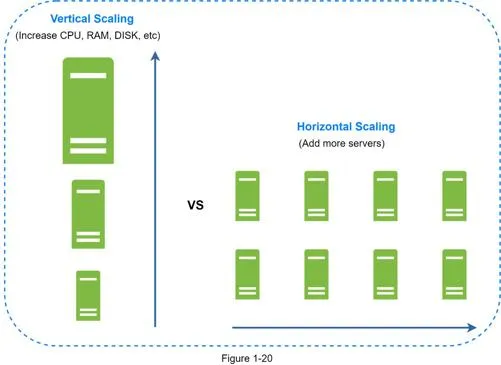
- Vertical (scale up): add more CPU/RAM to an existing server: simple, but hard limits, no failover, expensive
- Horizontal (scale out): add more servers to the resource pool: preferred for large-scale applications
Load balancer
Evenly distributes incoming traffic among web servers in a load-balanced set.
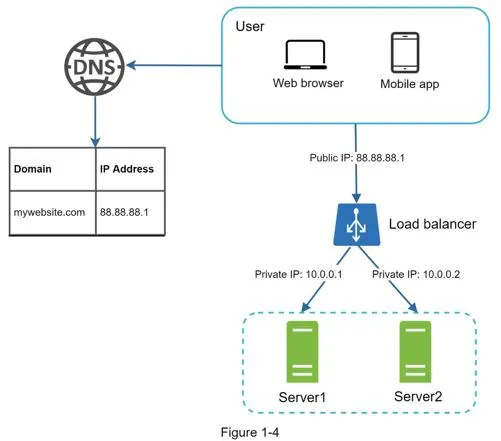
- Users connect to the load balancer's public IP
- Web servers use private IPs (unreachable from the internet)
- Server offline → traffic routes to healthy servers; new servers added seamlessly
- Solves failover and availability for the web tier
Phase 3 of 4: Scale the data tier
Database replication
Master/slave model: master supports writes only, slaves support reads only (typically more slaves; read ratio is higher).
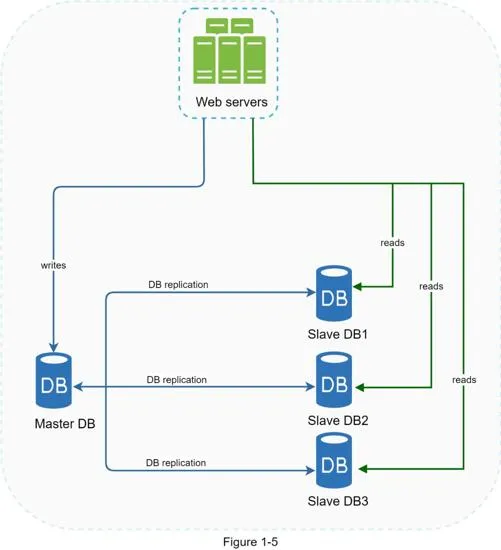
Advantages:
- Better performance: parallel query processing across slaves
- Reliability: data preserved even if one server is destroyed
- High availability: system operates even if one database is offline
Failure handling:
- Slave offline: reads redirected to master (or other slaves); new slave replaces the old one
- Master offline: a slave is promoted to new master (requires data recovery scripts for missing data). Multi-master and circular replication are more complex alternatives.
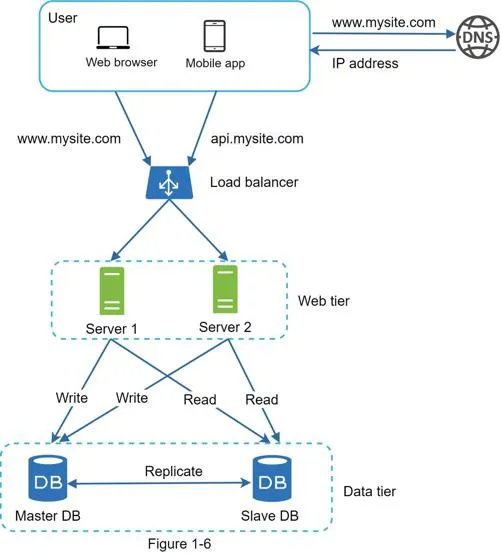
Full request flow: User → DNS → LB public IP → HTTP request routed to Server 1/2 → read from slave DB → write/update/delete → master DB.
Cache
Temporary storage in memory for expensive responses or frequently accessed data. Mitigates repeated database calls.

Read-through cache strategy: web server checks cache → hit: return data → miss: query DB, store in cache, return data.
Considerations:
- When to use: data read frequently, modified infrequently. Not ideal for persistent data (volatile memory)
- Expiration policy: too short = frequent DB reloads; too long = stale data
- Consistency: keeping data store and cache in sync is challenging at scale (see Facebook's "Scaling Memcache" paper)
- Mitigating failures: multiple cache servers across data centers avoid SPOF; overprovision memory by percentage
Eviction policy: LRU most popular. Also LFU, FIFO.
Content delivery network (CDN)
Network of geographically dispersed servers caching static content (images, videos, CSS, JS).
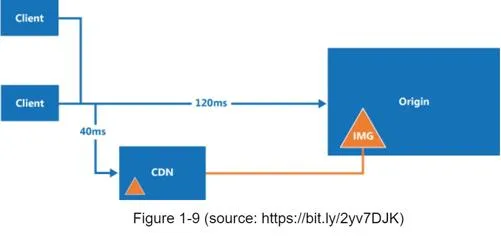
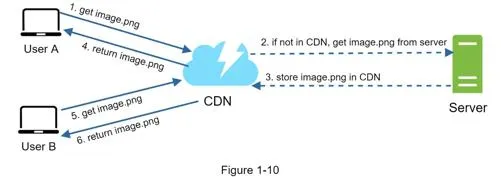
CDN workflow:
- User requests image via CDN-provided URL (e.g.
https://mysite.cloudfront.net/logo.jpg) - CDN server checks cache; on miss, requests from origin (web server or S3)
- Origin returns file with optional TTL header
- CDN caches and returns to User A
- User B requests same image → served from CDN cache (if TTL not expired)
Considerations:
- Cost: charged for data transfers in/out: remove infrequently used assets
- Cache expiry: too long = stale content; too short = repeated origin reloading
- CDN fallback: clients should detect CDN outage and request from origin
- Invalidating files: use CDN vendor APIs or object versioning (e.g.
image.png?v=2)
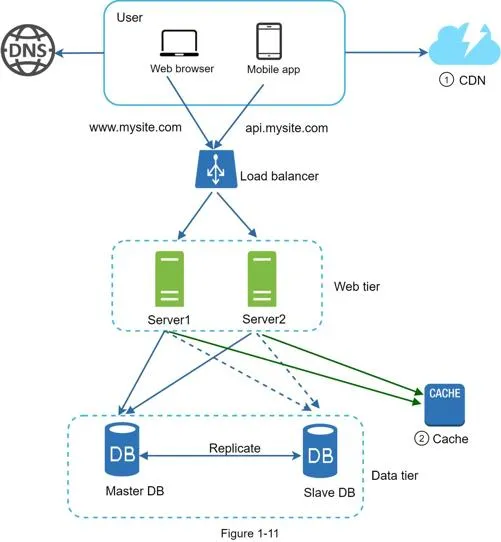
After CDN + cache: static assets served from CDN, database load lightened.
Phase 4 of 4: Scale to millions of users
Stateless web tier
Move state (session data) out of the web tier into persistent storage (DB or NoSQL) so any web server can handle any request.
Stateful architecture: sticky sessions required to route the same client to the same server. Adding/removing servers is difficult.
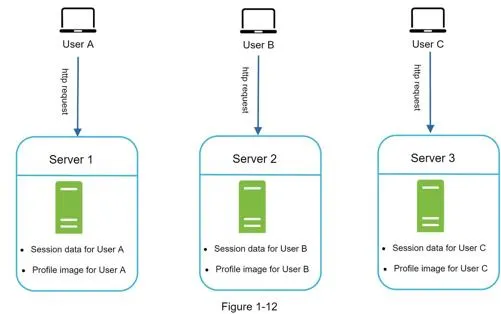
Stateless architecture: HTTP requests go to any server; state fetched from a shared data store.
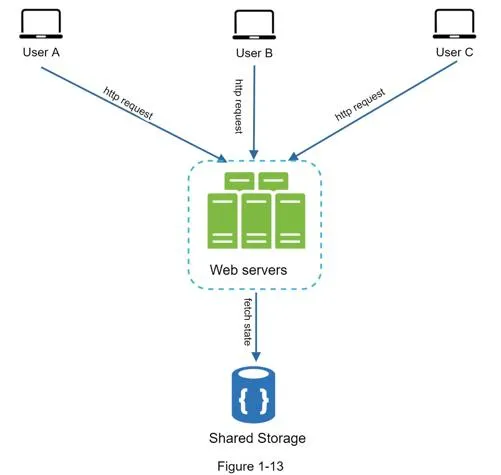
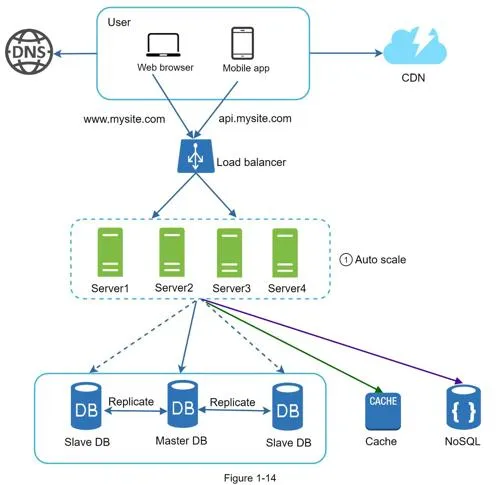
Benefits: simpler, more robust, scalable. Enables auto-scaling (add/remove servers based on traffic). NoSQL data store preferred for session data.
Data centers
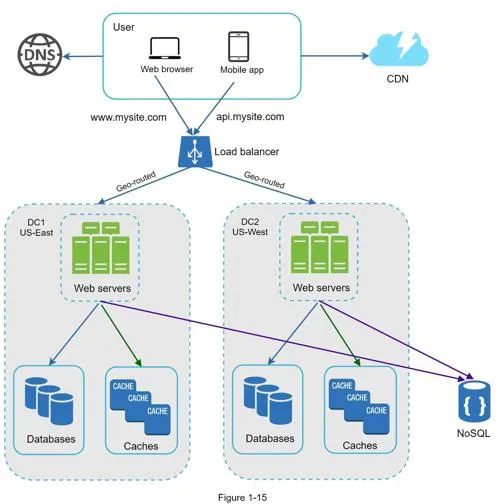
- Users geoDNS-routed to the closest data center (split traffic x% US-East, (100−x)% US-West)
- On data center outage, all traffic routed to the healthy data center
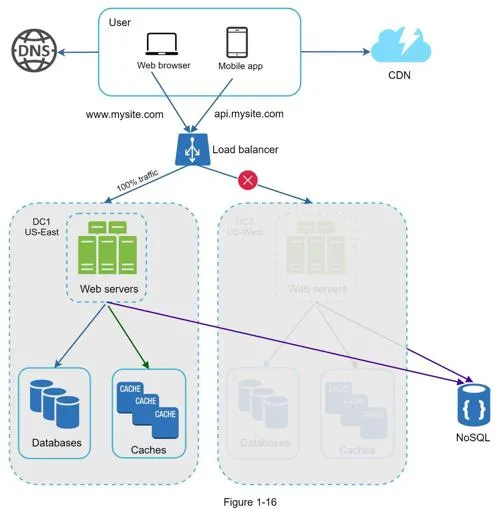
Technical challenges:
- Traffic redirection: GeoDNS directs to the nearest data center
- Data synchronization: replicate data across data centers (see Netflix's async multi-datacenter replication)
- Test and deployment: automated deployment tools essential for consistency across data centers
Message queue
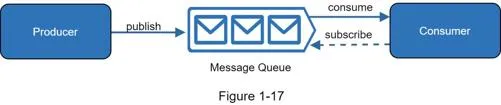
Durable, in-memory component supporting asynchronous communication. Producers publish messages, consumers subscribe and process.
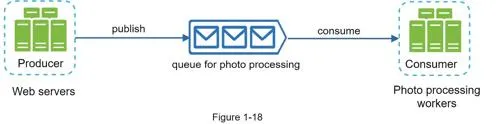
Decouples components so they scale independently. Example: photo processing. Web servers publish jobs to a queue, photo processing workers consume asynchronously. Queue grows → add more workers; queue empty → reduce workers.
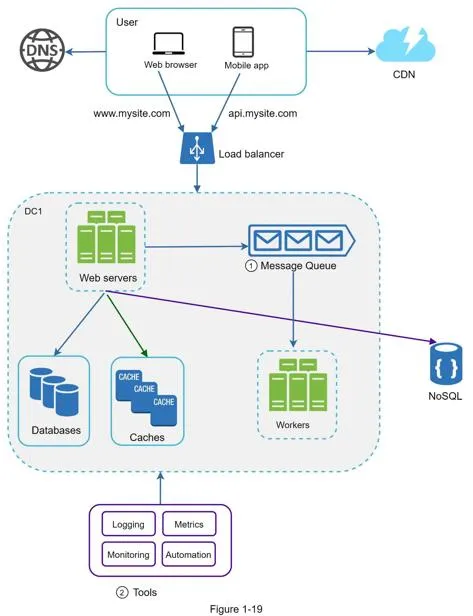
Logging, metrics, automation
Essential at scale:
- Logging: monitor error logs per server or aggregate to a centralized service
- Metrics: host-level (CPU, memory, disk I/O), aggregated (DB/cache tier performance), business (DAU, retention, revenue)
- Automation: CI (verify each check-in), automated build/test/deploy
Database scaling
Vertical scaling: add more CPU/RAM/disk to an existing machine. Stack Overflow (2013): 10M+ monthly unique visitors, 1 master DB. Limitations: hardware limits, SPOF risk, expensive.
Horizontal scaling (sharding): separate large databases into smaller shards, each with the same schema but unique data.
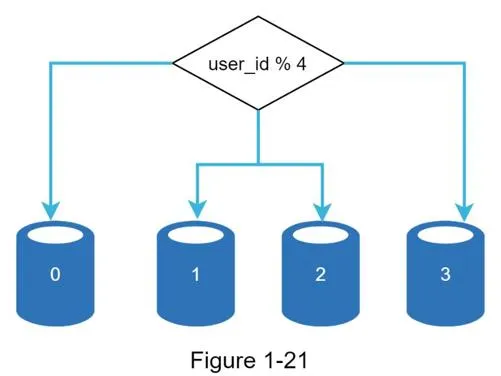
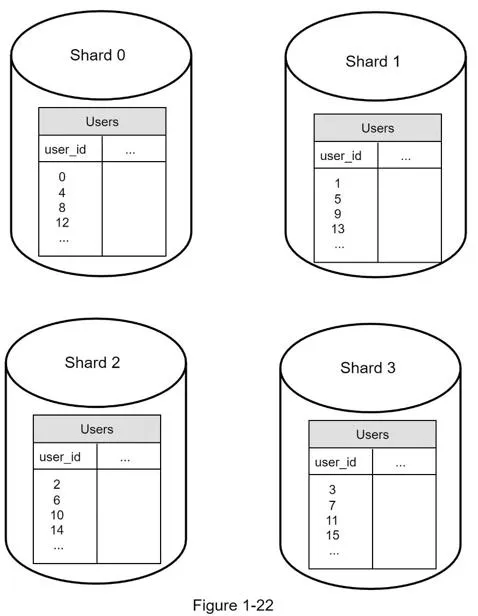
- Sharding key (partition key): determines data distribution. Example:
user_id % 4= shard index. Must evenly distribute data - Resharding: needed when a shard can't hold more data or uneven distribution causes shard exhaustion. Consistent hashing (Chapter 5) helps
- Celebrity/hotspot key problem: excessive access to a specific shard overloads the server. Solution: allocate dedicated shards for celebrities
- Join and de-normalization: JOINs are hard across shards. Workaround: de-normalize so queries work on a single table
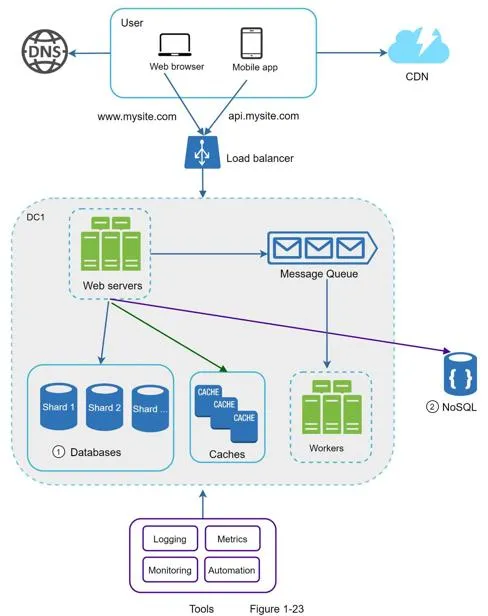
Summary: scaling to millions of users
Core moves:
- Keep the web tier stateless
- Build redundancy at every tier
- Cache data as much as you can
- Host static assets in a CDN
- Support multiple data centers
Once you're big:
- Scale the data tier by sharding
- Split tiers into individual services
- Monitor your system and use automation tools
[1] Hypertext Transfer Protocol: https://en.wikipedia.org/wiki/Hypertext_Transfer_Protocol [2] Should you go Beyond Relational Databases?: https://blog.teamtreehouse.com/should-you-go-beyond-relational-databases [3] Replication: https://en.wikipedia.org/wiki/Replication_(computing) [4] Multi-master replication: https://en.wikipedia.org/wiki/Multi-master_replication [5] NDB Cluster Replication: Multi-Master and Circular Replication: https://dev.mysql.com/doc/refman/5.7/en/mysql-cluster-replication-multi-master.html [6] Caching Strategies and How to Choose the Right One: https://codeahoy.com/2017/08/11/caching-strategies-and-how-to-choose-the-right-one/ [7] R. Nishtala, "Facebook, Scaling Memcache at," 10th USENIX Symposium on Networked Systems Design and Implementation (NSDI '13). [8] Single point of failure: https://en.wikipedia.org/wiki/Single_point_of_failure [9] Amazon CloudFront Dynamic Content Delivery: https://aws.amazon.com/cloudfront/dynamic-content/ [10] Configure Sticky Sessions for Your Classic Load Balancer: https://docs.aws.amazon.com/elasticloadbalancing/latest/classic/elb-sticky-sessions.html [11] Active-Active for Multi-Regional Resiliency: https://netflixtechblog.com/active-active-for-multi-regional-resiliency-c47719f6685b [12] Amazon EC2 High Memory Instances: https://aws.amazon.com/ec2/instance-types/high-memory/ [13] What it takes to run Stack Overflow: http://nickcraver.com/blog/2013/11/22/what-it-takes-to-run-stack-overflow [14] What The Heck Are You Actually Using NoSQL For: http://highscalability.com/blog/2010/12/6/what-the-heck-are-you-actually-using-nosql-for.html