Design a Web Crawler
5 min read- What it is: crawl 1B pages/month (~400 pages/s) for search engine indexing; HTML only
- 4 qualities: scalable, robust, polite (never flood a host), extensible
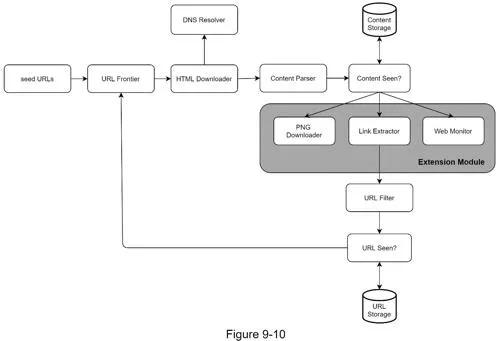
- Core pipeline: seed URLs → URL frontier → downloader → parser → dedup → extract links → filter → back to frontier
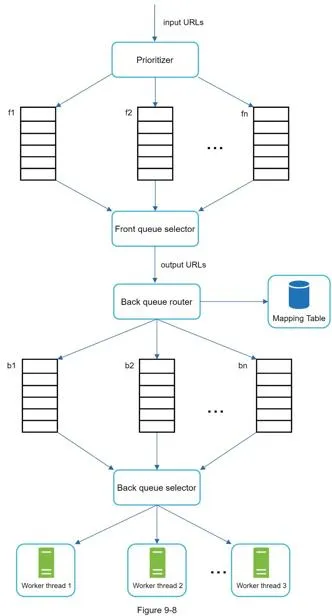
- URL frontier is the hard part: front queues (priority) + back queues (politeness: one page at a time per host)
- Storage: 500 TB/month → 30 PB over 5 years; ~29% of the web is duplicate content
- Gotchas: robots.txt first, spider traps, DNS caching (10–200ms latency)
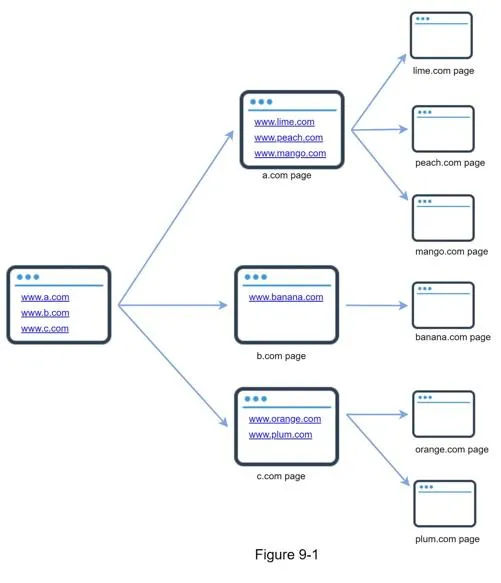
A web crawler collects web pages and follows links to discover new content. Use cases: search engine indexing, web archiving, web mining, web monitoring.
Step 1 of 4: Understand the problem and establish design scope
Goal: lock in requirements and scale numbers.
Requirements:
- Purpose: search engine indexing
- 1 billion pages/month, HTML only
- Consider newly added/edited pages
- Store HTML pages for 5 years
- Ignore duplicate content pages
Key characteristics of a good crawler:
- Scalability: parallelized crawling of billions of pages
- Robustness: handle bad HTML, unresponsive servers, crashes, malicious links
- Politeness: don't overwhelm a single host with rapid requests
- Extensibility: easy to add support for new content types (images, etc.)
Back of the envelope estimation:
- QPS: 1B / 30 days / 24h / 3600s = ~400 pages/s
- Peak QPS: 2× = 800 pages/s
- Avg page size: 500 KB → 500 TB/month
- 5-year storage: 500 TB × 12 × 5 = 30 PB
Step 2 of 4: Propose high-level design and get buy-in
Goal: agree on the pipeline and each component's job.
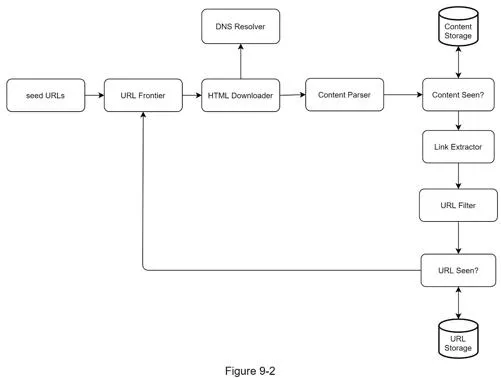
Components:
- Seed URLs: starting points. Divide URL space by locality (country) or topic
- URL Frontier: FIFO queue storing URLs to be downloaded
- HTML Downloader: downloads pages via HTTP; uses DNS Resolver for IP resolution
- Content Parser: validates and parses downloaded HTML pages (separate component to avoid slowing crawls)
- Content Seen?: eliminates duplicate content (~29% of web is duplicated). Uses hash comparison for efficiency
- Content Storage: disk for bulk data, memory for popular content
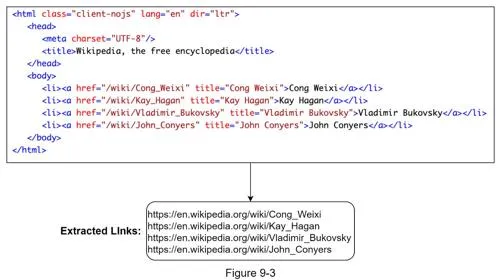
- URL Extractor: parses links from HTML; converts relative paths to absolute URLs
- URL Filter: excludes blacklisted sites, unwanted file types, error links
- URL Seen?: tracks already-visited URLs using Bloom filter or hash table to avoid infinite loops
Workflow:
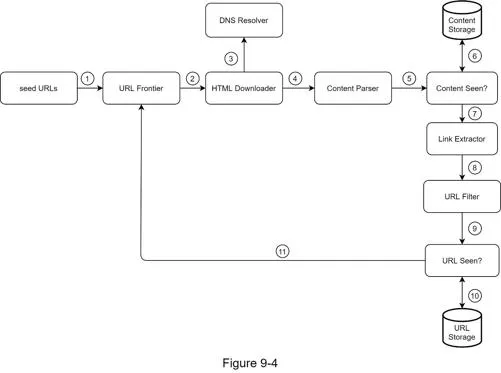
- Add seed URLs to URL Frontier
- HTML Downloader fetches URLs from Frontier → DNS resolution → download
- Content Parser validates HTML
- Content Seen? checks for duplicates → discard if duplicate
- URL Extractor extracts links → URL Filter → URL Seen? → add new URLs to Frontier
Step 3 of 4: Design deep dive
Goal: the URL frontier, downloader optimizations, robustness, and traps.
DFS vs BFS
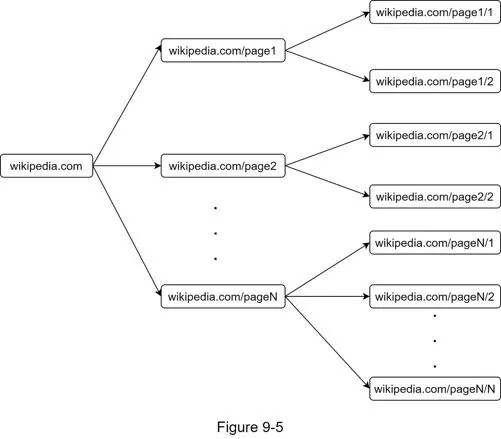
- DFS can go infinitely deep → not suitable
- BFS (FIFO queue) is standard, but has problems:
- Many links point to the same host → floods that host (impolite)
- Doesn't prioritize URLs by importance (PageRank, traffic, update frequency)
URL Frontier (solves BFS problems)
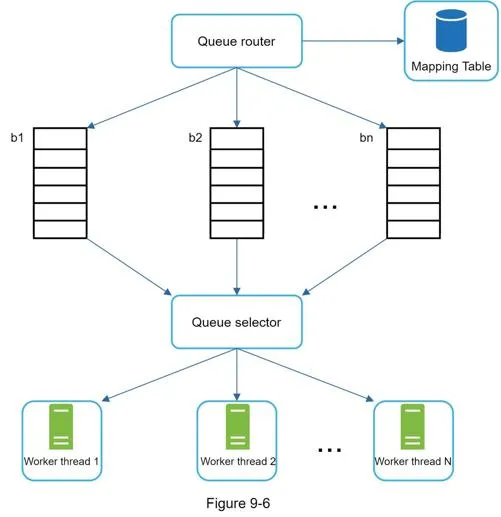
Politeness: one page at a time per host. Implemented via:
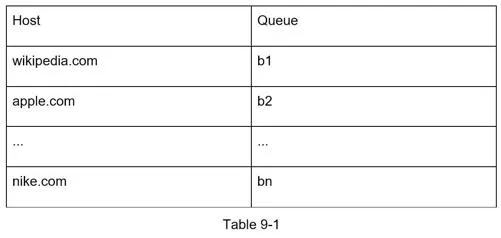
- Queue router ensures each FIFO queue has URLs from only one host
- Mapping table: host → queue
- Each worker thread bound to one queue, downloads with a delay between requests
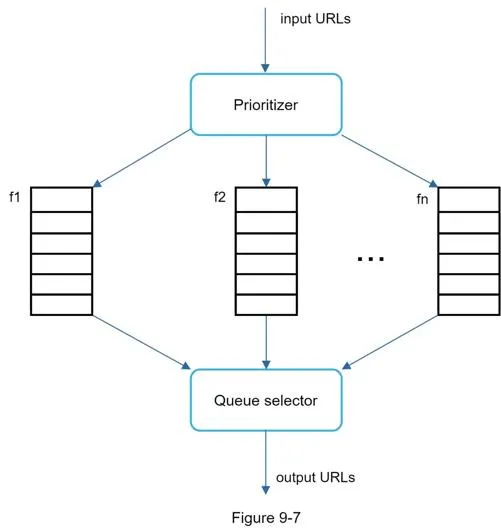
Priority: prioritizer computes URL usefulness (PageRank, traffic, update frequency). High-priority queues selected with higher probability.
Full URL Frontier design:
- Front queues: manage prioritization
- Back queues: manage politeness
Freshness: recrawl based on update history; prioritize important pages.
Storage for URL Frontier: hybrid: majority on disk, buffers in memory for enqueue/dequeue. Hundreds of millions of URLs.
HTML Downloader
Robots.txt (Robots Exclusion Protocol): check before crawling to see allowed/disallowed paths. Cache results to avoid repeated downloads.
Performance optimizations:
- Distributed crawl: partition URL space across multiple servers with consistent hashing
- Cache DNS Resolver: DNS latency 10–200ms; maintain cached domain→IP mapping updated by cron jobs
- Locality: place crawl servers geographically close to website hosts
- Short timeout: avoid hanging on slow/unresponsive servers
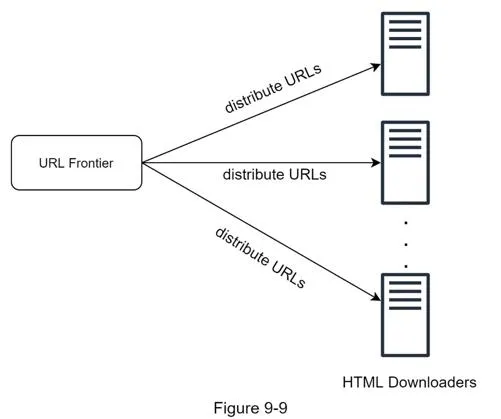
Robustness
- Consistent hashing: distribute load, allow adding/removing downloaders
- Save crawl states and data: restart interrupted crawls from saved state
- Exception handling: graceful error handling without crashes
- Data validation: prevent system errors
Extensibility
Plug in new modules (PNG Downloader, Web Monitor) without rearchitecting.
Detect and avoid problematic content
- Redundant content: detect duplicates using hashes/checksums
- Spider traps: infinite loops (e.g. endless directory nesting). Mitigate with URL max length; manual verification for known traps
- Data noise: exclude ads, code snippets, spam URLs: little value for indexing
Step 4 of 4: Wrap up
Additional talking points:
- Server-side rendering: execute JavaScript to capture dynamically generated links
- Anti-spam filters: filter low-quality/spam pages
- Database replication and sharding
- Horizontal scaling: keep servers stateless
- Availability, consistency, reliability (Ch.1)
- Analytics: data collection for fine-tuning
[1] US Library of Congress: https://www.loc.gov/websites/ [2] EU Web Archive: http://data.europa.eu/webarchive [3] Digimarc: https://www.digimarc.com/products/digimarc-services/piracy-intelligence [4] Heydon A., Najork M., Mercator (1999) [5] Olston, Najork: Web Crawling survey [6] 29% duplicate content: https://tinyurl.com/y6tmh55y [7] Rabin M.O., Fingerprinting by random polynomials (1981) [8] Bloom, Space/time trade-offs in hash coding (1970) [9] Patterson, Web Crawling lecture [10] Page, Brin et al., PageRank (1998) [11] Google Dynamic Rendering [12] Urvoy et al., Tracking web spam (2006) [13] Lee et al., IRLbot: Scaling to 6 billion pages (2008)