Design Google Drive
6 min read- What it is: file storage + sync across devices, sharing, version history, edit/delete/share notifications
- Numbers: 50M users, 10M DAU, 500 PB allocated, ~240 upload QPS (peak 480)
- Key move: block servers split files into ≤4MB blocks → compress → encrypt → S3; delta sync uploads only changed blocks
- Consistency: strong: relational DB (ACID), cache invalidation on DB write; conflicts = first-write-wins + show both copies
- Notifications: long polling chosen (one-directional, infrequent) over WebSocket
- Cost: de-dupe blocks, keep only valuable versions, cold storage in S3 Glacier
Google Drive: file storage and synchronization service. Access files from any device; share with others.
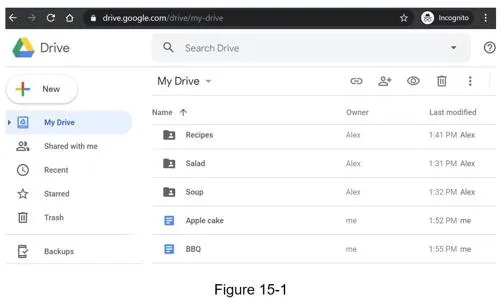
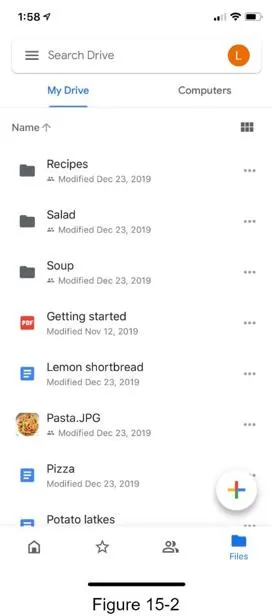
Step 1 of 4: Understand the problem and establish design scope
Goal: lock in requirements and scale numbers.
Requirements (in-scope):
- Add files (drag & drop), download files
- Sync files across multiple devices
- See file revisions (version history)
- Share files with friends/family/coworkers
- Notifications on file edit, delete, share
Out of scope: Google Doc collaborative editing.
Non-functional requirements:
- Reliability: data loss is unacceptable
- Fast sync speed
- Bandwidth usage: minimize, especially on mobile data
- Scalability, high availability
Back of the envelope estimation:
- 50M signed up users, 10M DAU
- 10 GB free space per user → 500 PB total allocated
- 2 file uploads/day, avg 500 KB per file
- 1:1 read:write ratio
- Upload QPS: 10M × 2 / 86400 = ~240 QPS
- Peak QPS: 480
Step 2 of 4: Propose high-level design and get buy-in
Goal: start single-server, then scale out: shard by user, S3 for files, blocks for delta sync.
Starting point: single server
Apache web server, MySQL, /drive/ root directory with per-user namespaces. Uniquely identify files by joining namespace + relative path.
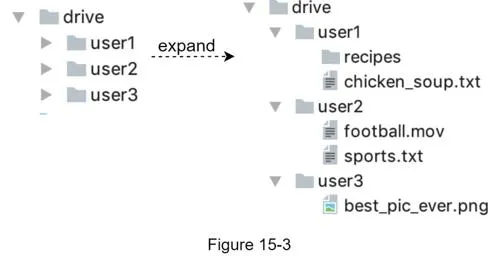
APIs
- Upload: simple upload (small files) or resumable upload (large files, network interruption). Steps: request resumable URL → upload data + monitor → resume if interrupted
POST https://api.example.com/files/upload?uploadType=resumable
- Download:
GET https://api.example.com/files/download, parampath - Get file revisions:
GET https://api.example.com/files/list_revisions, paramspath,limit
All APIs require HTTPS + authentication.
Scaling out
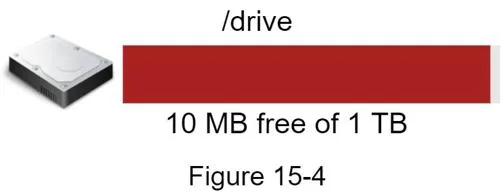
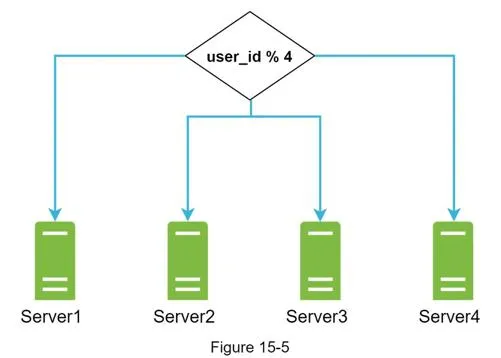
- Shard by user_id across multiple storage servers
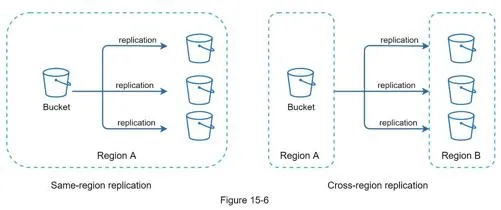
- Move files to Amazon S3: same-region + cross-region replication for durability
Further improvements:
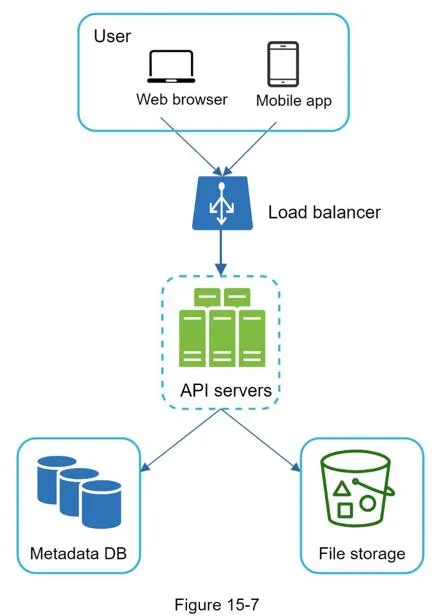
- Add a load balancer + more web servers
- Move the metadata DB out of the server → replication + sharding
- S3 for file storage with multi-region replication
Sync conflicts
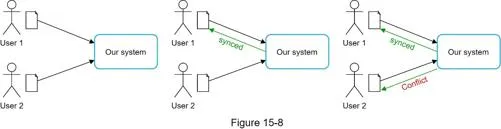
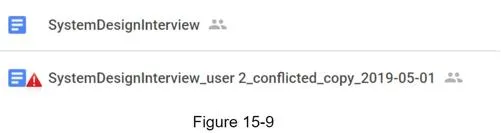
First-write-wins strategy: the first version processed succeeds; the later version receives a conflict. User is presented with both copies: can merge or override.
High-level design
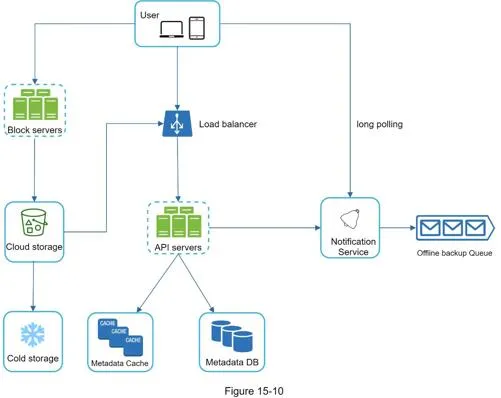
Components:
- Block servers: split files into blocks (max 4MB per Dropbox reference), compress, encrypt, upload to cloud. Enable delta sync (only changed blocks transferred)
- Cloud storage (S3): stores file blocks
- Cold storage (S3 Glacier): inactive data
- Load balancer: distributes requests to API servers
- API servers: authentication, user profile, file metadata management
- Metadata database: user, file, block, version metadata (files themselves in cloud)
- Metadata cache: fast retrieval of frequently accessed metadata
- Notification service: pub/sub; notifies clients when files are added/edited/removed
- Offline backup queue: stores changes for offline clients to sync when they reconnect
Step 3 of 4: Design deep dive
Goal: block servers, strong consistency, flows, notifications, storage savings.
Block servers
Optimizations to reduce network traffic:
- Delta sync: only sync modified blocks (rsync algorithm)
- Compression: gzip/bzip2 for text; different algorithms for images/video
Flow for a new file:
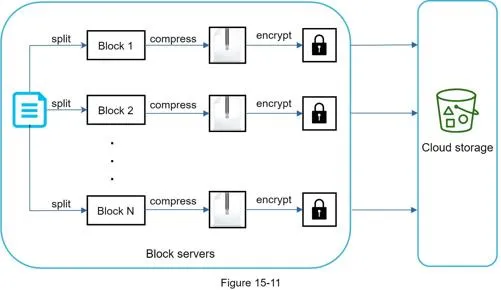
Split → compress each block → encrypt → upload to cloud storage.
Delta sync:
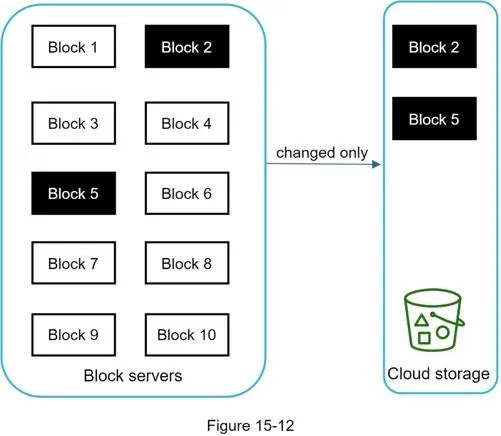
Only changed blocks (e.g. block 2 and block 5) are uploaded.
High consistency requirement
System requires strong consistency: files must not appear differently to different clients simultaneously.
- Memory caches default to eventual consistency → must enforce:
- Cache replicas consistent with master
- Cache invalidation on DB write
- Relational database chosen over NoSQL because ACID is natively supported (NoSQL requires programmatic ACID in sync logic)
Metadata database
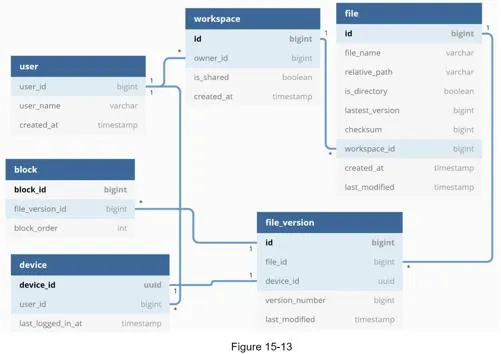
Schema (simplified):
- User: username, email, profile photo
- Device: device info,
push_idfor mobile notifications (one user → many devices) - Namespace: root directory of a user
- File: latest file information
- File_version: version history; rows are read-only for revision integrity
- Block: file block info; any version reconstructed by joining blocks in order
Upload flow
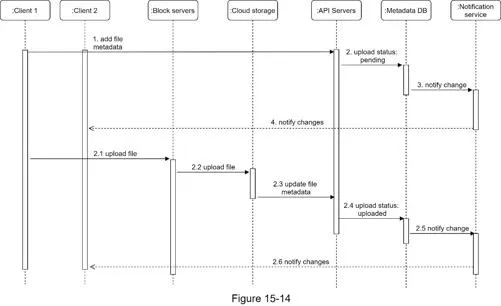
Two parallel requests from client 1:
Add file metadata:
- Client 1 sends metadata → 2. Store in metadata DB, status = "pending" → 3. Notify notification service → 4. Notification service informs client 2
Upload files to cloud storage:
- Client 1 uploads to block servers → 2. Block servers chunk, compress, encrypt, upload to S3 → 3. S3 triggers upload completion callback to API servers → 4. File status → "uploaded" in metadata DB → 5. Notification service notified → 6. Client 2 informed
Download flow
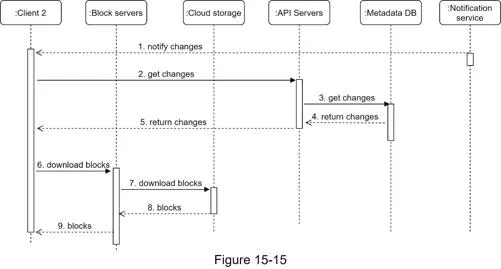
Client learns of changes via:
- Online: notification service informs
- Offline: changes held in the offline backup queue; synced on reconnect
Flow:
- Notification service informs client 2 → 2. Client 2 requests metadata → 3. API servers fetch from metadata DB → 4–5. Metadata returned → 6. Client 2 requests blocks from block servers → 7. Block servers fetch from cloud storage → 8–9. Blocks returned, client reconstructs file
Notification service
Options: long polling vs WebSocket.
Chose long polling because:
- Communication is one-directional (server → client about file changes)
- WebSocket is better for real-time bidirectional (chat apps); Google Drive notifications are infrequent
Client holds a long poll connection. File change detected → connection closed → client connects to metadata server to download latest changes → immediately sends a new long poll request.
Save storage space
- De-duplicate data blocks: identical hash → same block; eliminate redundant blocks
- Intelligent backup strategy: limit number of versions; keep only valuable versions (weight recent versions higher)
- Cold storage: move inactive data (months/years) to S3 Glacier: much cheaper than S3
Failure handling
| Component | Failure handling |
|---|---|
| Load balancer | Secondary takes over; heartbeat monitoring |
| Block server | Other servers pick up pending jobs |
| Cloud storage | S3 multi-region replication |
| API server | Stateless → traffic redirected |
| Metadata cache | Multi-replica; replace dead node |
| Metadata DB master | Promote slave; bring up new slave |
| Metadata DB slave | Use other slave; replace dead one |
| Notification service | ~1M connections/server; clients reconnect to different server (slow process) |
| Offline backup queue | Replicated queues; consumers re-subscribe to backup |
Step 4 of 4: Wrap up
Alternative design: upload directly to cloud from client:
- Pro: faster (one transfer vs. client → block server → cloud)
- Cons: chunking/compression/encryption logic duplicated across platforms (iOS, Android, Web); client-side encryption less secure
Additional evolution: move online/offline logic to a separate presence service (reusable by other services).
[1] Google Drive: https://www.google.com/drive/ [2] Upload file data (Google Drive API) [3] Amazon S3 [4] Differential Synchronization (Neil Fraser) [5] Differential Synchronization YouTube talk [6] How We've Scaled Dropbox [7] Tridgell & Mackerras, The rsync algorithm (1996) [8] Librsync [9] ACID: https://en.wikipedia.org/wiki/ACID [10] Dropbox security white paper [11] Amazon S3 Glacier