Distributed Email Service
8 min read- What it is: Gmail/Outlook scale: 1B users; send/receive, search, anti-spam; HTTP clients (not POP/IMAP)
- Scale: 100K send QPS; ~730 PB/yr metadata + ~1,460 PB/yr attachments → distributed storage required
- Architecture: web servers + real-time (WebSocket) + metadata DB + S3 attachments + Redis + search store; message queues decouple send/receive
- Metadata DB is the hard part: NoSQL,
user_idpartition key, denormalize read/unread into 2 tables (NoSQL rejects is_read queries) - Search: Elasticsearch for small scale; Gmail scale → custom LSM-tree index (disk I/O is the bottleneck)
- Deliverability: dedicated IPs, warm-up 2-6 weeks, SPF/DKIM/DMARC: >50% of all email is spam
Design a large-scale email service (Gmail, Outlook, Yahoo Mail). In 2020, Gmail had 1.8B+ active users, Outlook 400M+.

Figure 1: Popular email providers
Step 1 of 4: Understand the problem and establish design scope
Goal: lock in requirements and scale.
Requirements
- 1 billion users
- Features: send/receive emails, fetch all emails, filter by read/unread, search by subject/sender/body, anti-spam/anti-virus
- Authentication out of scope
- HTTP for client-server communication (not SMTP/POP/IMAP for clients)
- Attachments supported
Non-functional:
- Reliability: no email data loss
- Availability: auto-replication across nodes, partial failures tolerated
- Scalability: handle growing users/emails without performance degradation
- Flexibility/extensibility: custom protocols may be needed (POP/IMAP limited)
Back-of-the-envelope estimation:
- 1B users, avg 10 sent/day → QPS = 10⁹ × 10 / 86,400 = 100,000
- Avg 40 received/day, metadata 50KB → yearly metadata: 1B × 40 × 365 × 50KB = 730 PB
- 20% of emails have attachments, avg 500KB → yearly attachments: 1B × 40 × 365 × 20% × 500KB = 1,460 PB
- → Distributed database required
Step 2 of 4: Propose high-level design and get buy-in
Goal: understand protocols, then the distributed architecture + send/receive flows.
Email knowledge 101
Protocols:
- SMTP: standard for sending between mail servers
- POP: download from server to local, deletes from server (single device access). Downloads the entire email (slow for large attachments). RFC 1939
- IMAP: emails stay on the server, multi-device access. Downloads only headers until opened. Most widely used
- HTTPS: used for web-based email (e.g. Outlook ActiveSync for mobile)
DNS: MX records for the recipient domain. Lower priority number = more preferred.
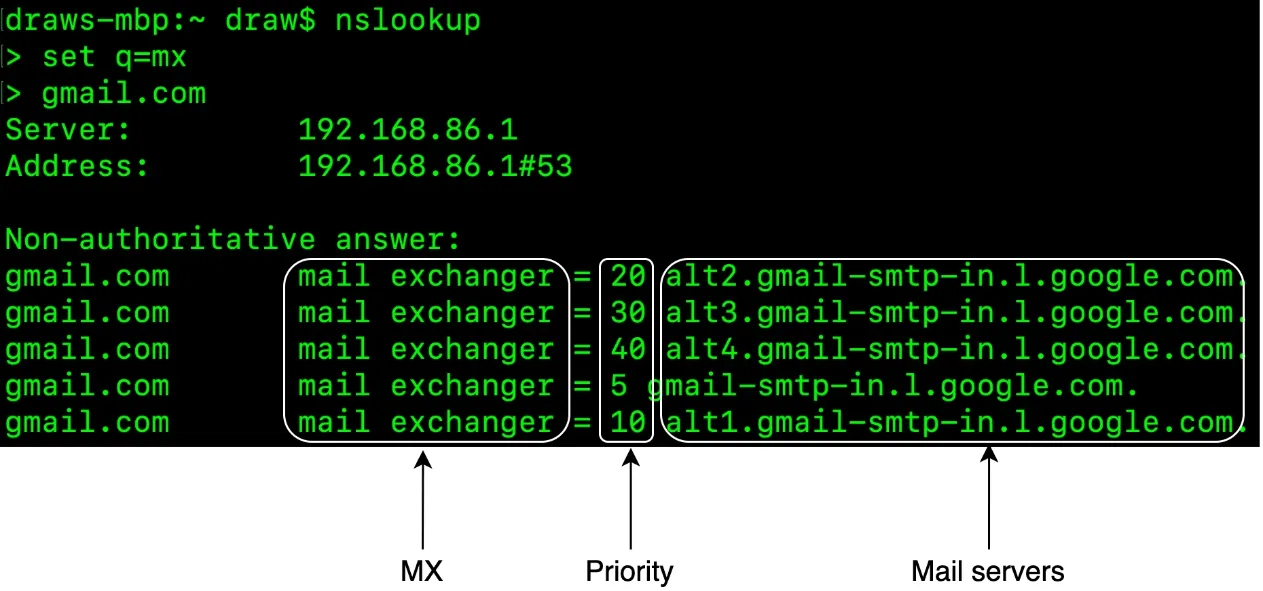
Figure 2: MX records
Attachments: Base64 encoding, MIME specification. Size limits: Outlook 20MB, Gmail 25MB.
Traditional mail servers
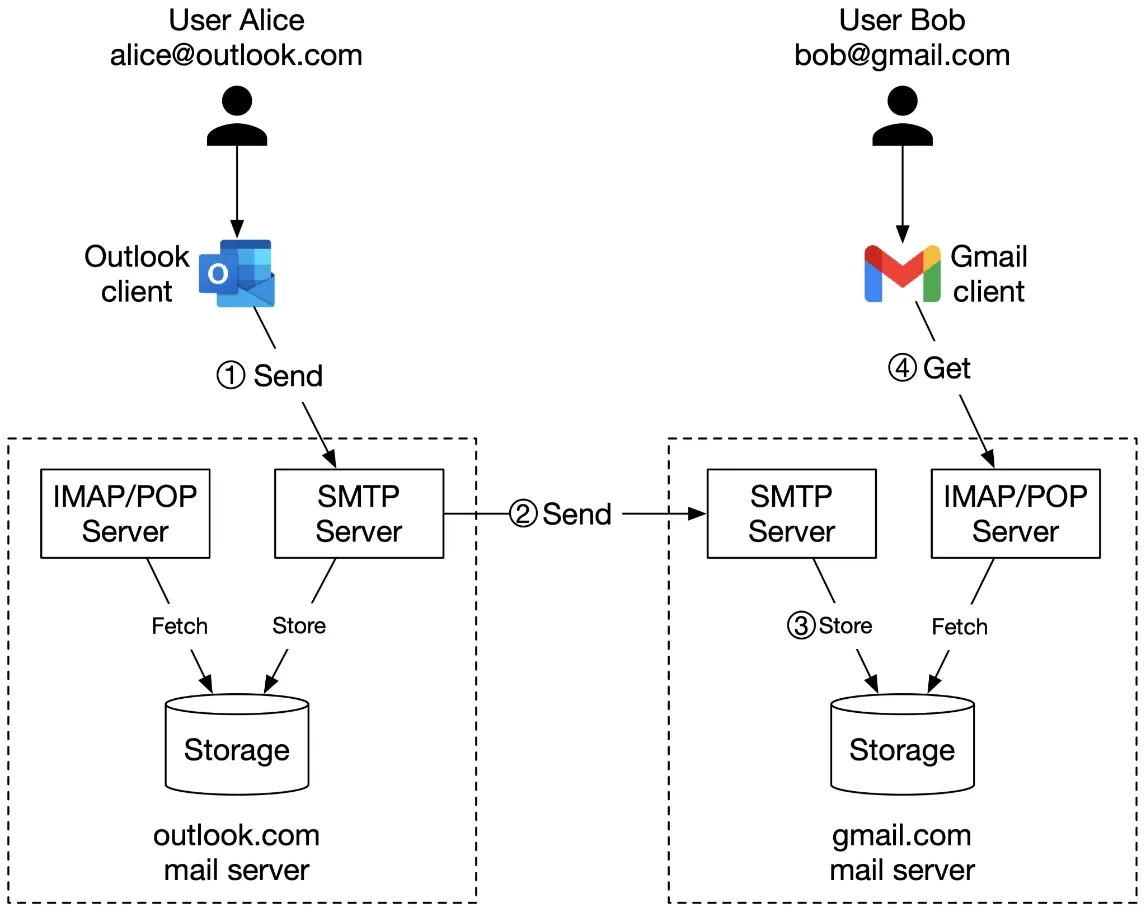
Figure 3: Traditional mail servers
Flow: Alice (Outlook) → SMTP → Outlook server → DNS lookup → SMTP → Gmail server → Bob fetches via IMAP/POP.
Storage: historically Maildir: each email a separate file in the user directory. Works for small scale; disk I/O becomes a bottleneck for billions of emails. No HA/reliability.
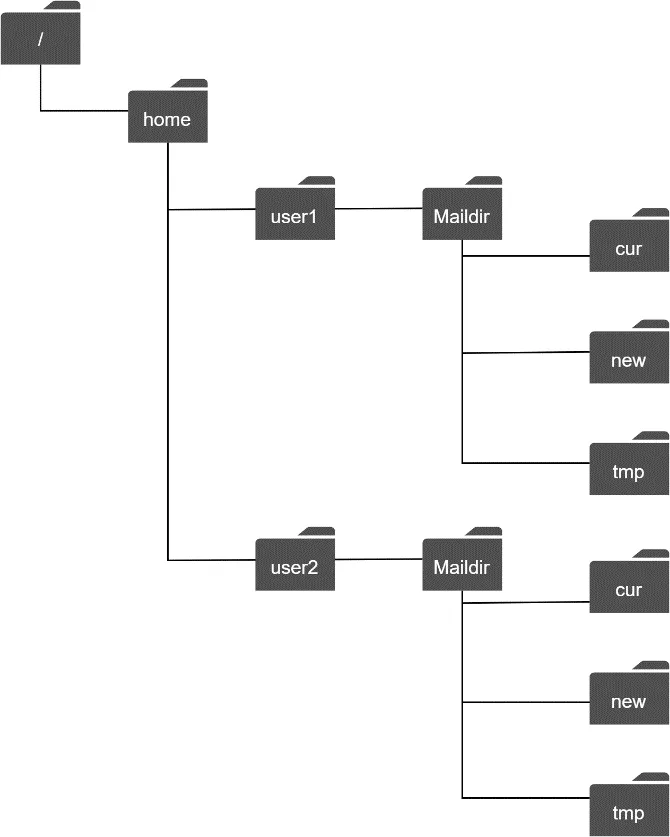
Figure 4: Maildir
Distributed mail servers
Email APIs (RESTful/HTTP for webmail):
POST /v1/messages: send email (To, Cc, Bcc)GET /v1/folders: returns all folders. RFC6154 defaults: All, Archive, Drafts, Flagged, Junk, Sent, TrashGET /v1/folders/{folder_id}/messages: messages under a folder (supports consecutive + range-based paging)GET /v1/messages/{message_id}: message details (from, to, subject, body, is_read)
Distributed mail server architecture:
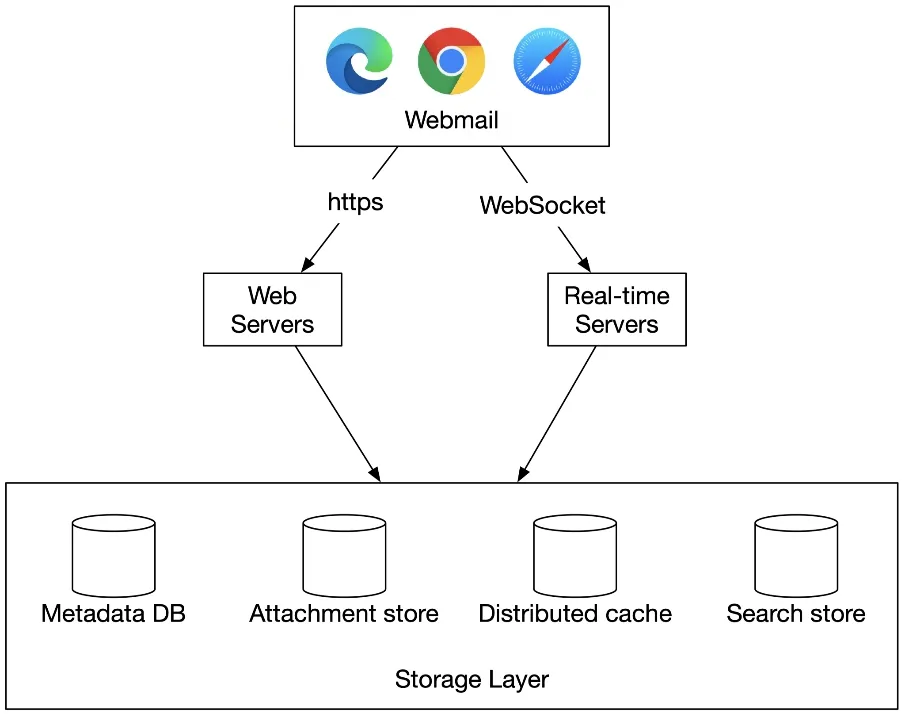
Figure 5: High-level design
Components:
- Web servers: public-facing, handle all API requests (login, signup, email CRUD)
- Real-time servers: push new email updates via WebSocket (fallback: long polling). Stateful (persistent connections). Apache James implements JMAP over WebSocket
- Metadata database: stores subject, body, from/to. Discussed in the deep dive
- Attachment store: object storage (S3). Not Cassandra (blob limit <1MB practical, row cache issues with large attachments)
- Distributed cache (Redis): recent emails cached in memory. Redis offers lists, easy to scale
- Search store: distributed document store with inverted index for full-text search
Email sending flow:
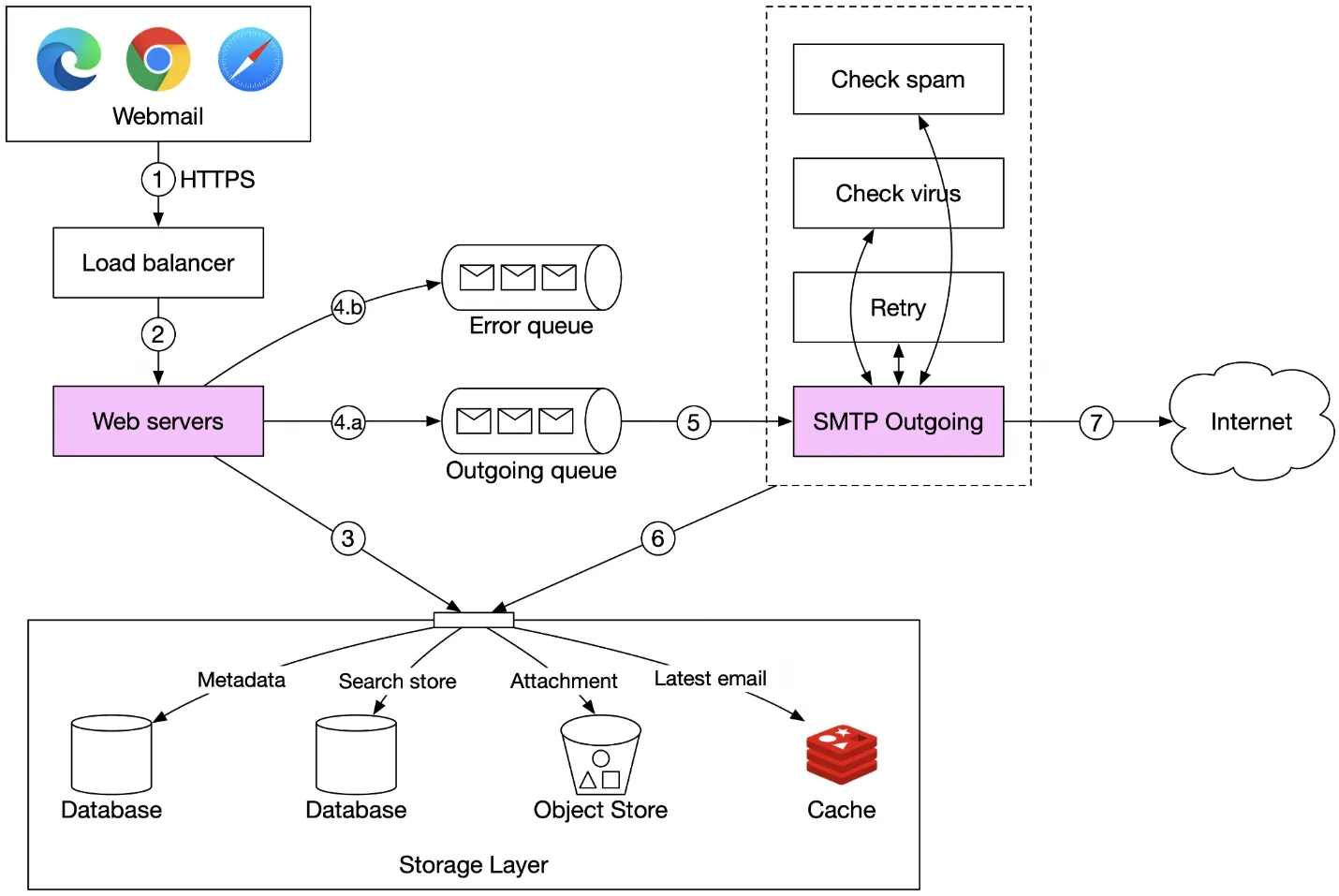
Figure 6: Email sending flow
- User writes email → load balancer (rate limiting)
- Web server validates (size limits, etc.)
- If same domain (sender = recipient): insert directly to storage/cache/object store, skip SMTP
- Message queue: valid → outgoing queue; invalid → error queue
- SMTP outgoing workers: pull from queue, check spam/virus, store in "Sent Folder", send to recipient server
The message queue decouples web servers from SMTP workers → independent scaling. Monitor queue size:
- Recipient server unavailable → exponential backoff retry
- Not enough consumers → add more workers
Email receiving flow:
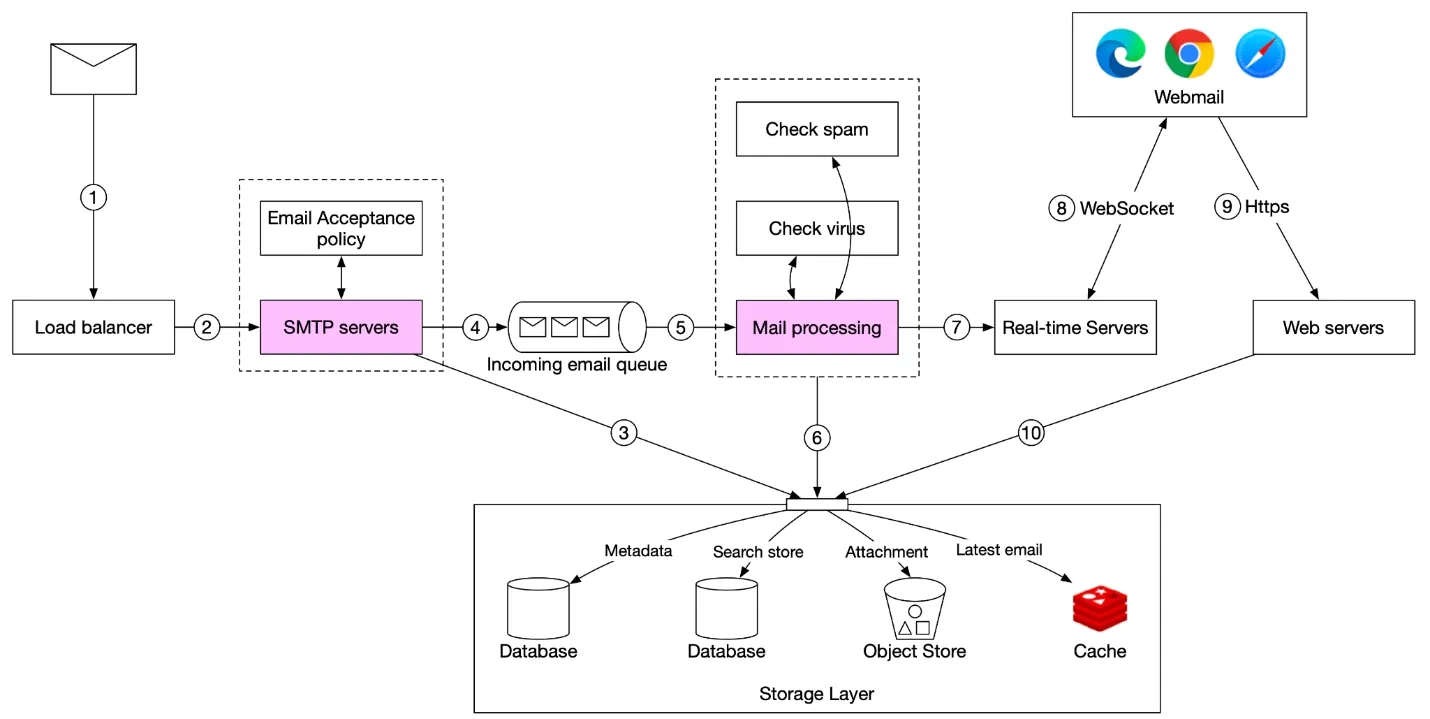
Figure 7: Email receiving flow
- Incoming → SMTP load balancer
- SMTP servers: apply acceptance policy, bounce invalid emails
- Large attachments → stored in S3 (not queued)
- Emails → incoming email queue (buffer for surges)
- Mail processing workers: spam filtering, virus scanning
- Valid email → stored in mail storage, cache, object store
- Receiver online → push to real-time servers (WebSocket)
- Receiver offline → stored in the storage layer; on reconnect, webmail client fetches via RESTful API
Step 3 of 4: Design deep dive
Goal: the metadata DB, deliverability, search.
Metadata database
Characteristics of email metadata:
- Headers: small, frequently accessed
- Body: variable size, infrequently accessed (read once)
- Operations isolated to an individual user
- 82% of read queries are for data <16 days old
- High reliability (no data loss)
Database options:
| Option | Assessment |
|---|---|
| Relational (MySQL/PostgreSQL) | Indexes for search, but BLOB search inefficient. Large emails (>100KB) problematic. Not ideal. |
| Distributed object storage (S3) | Good for backup, but hard to support mark-as-read, keyword search, threading. |
| NoSQL (Google Bigtable) | Used by Gmail. Viable. Cassandra possible but no large email providers use it. |
Custom database characteristics needed: single column up to MB size, strong consistency, reduced disk I/O, HA/fault-tolerant, easy incremental backups.
Data model: user_id as partition key (one user's data on one shard). Messages not shared across users (not required).
Queries & tables:
Query 1. Get all folders: partition key user_id. All folders for a user in one partition.
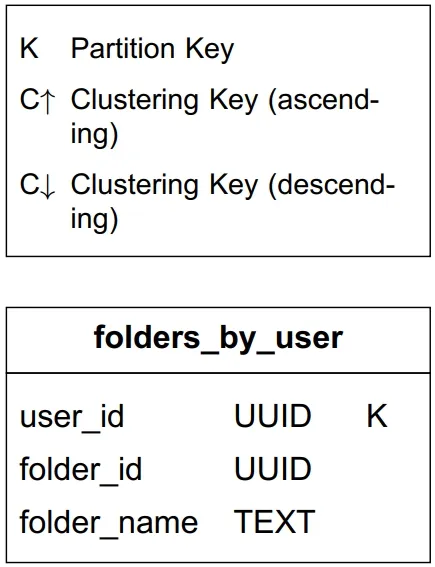
Table 1: Folders by user
Query 2. Display emails for a folder: composite PK <user_id, folder_id>. Clustering key: email_id (TIMEUUID, chronological order).
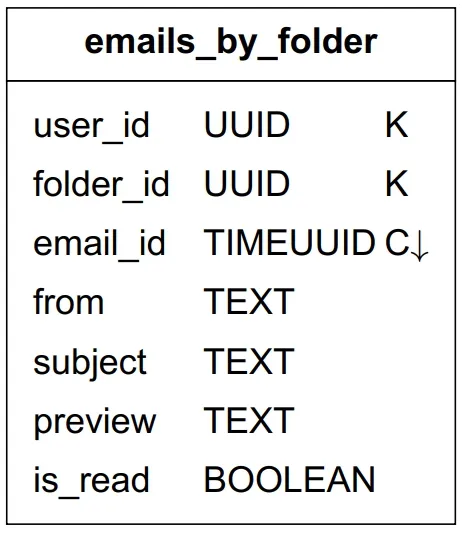
Table 2: Emails by folder
Query 3. Get email details: SELECT * FROM emails_by_user WHERE email_id = 123;. Attachments retrieved by <email_id, filename>.
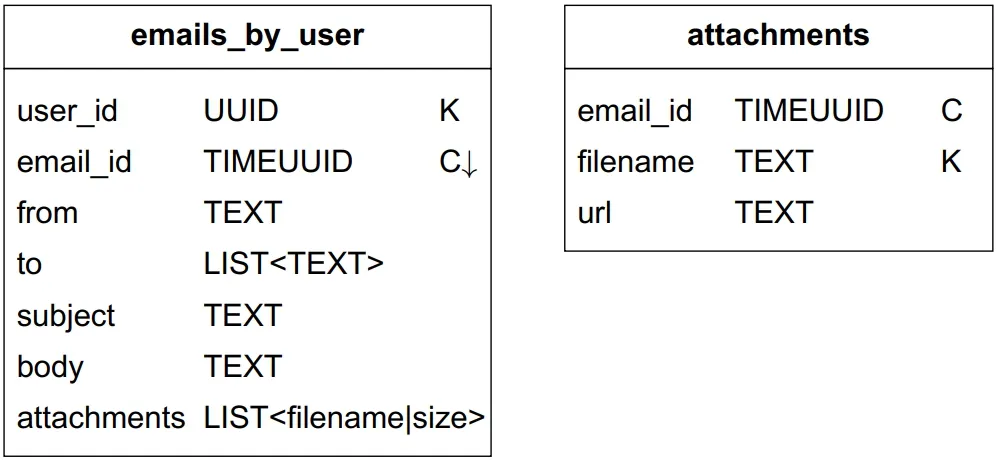
Table 3: Emails by user
Query 4. Fetch read/unread emails: problem, is_read is neither a partition nor a clustering key → NoSQL rejects the query. Solution: denormalization into two tables: read_emails and unread_emails. Marking UNREAD→READ: delete from unread, insert into read.
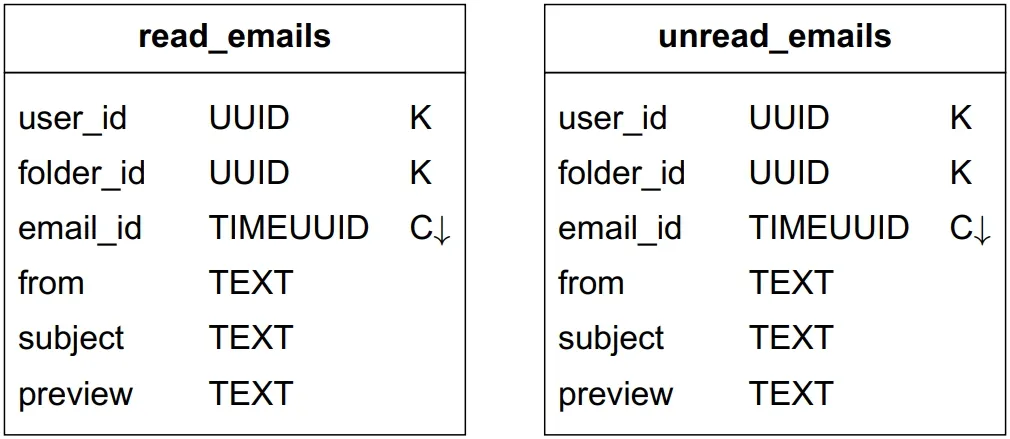
Table 4: Read and unread emails
Bonus: Conversation threads: uses headers Message-Id, In-Reply-To, References. The JWZ algorithm reconstructs conversations from reply chains.
Consistency trade-off: single primary per mailbox. On failover, the mailbox is inaccessible until failover completes. Trades availability for consistency (correctness is paramount).
Email deliverability
50% of all emails are spam. New mail servers have no reputation: their emails likely land in spam.
Best practices:
- Dedicated IPs: separate IPs for sending; history builds reputation
- Classify emails: different IPs for marketing vs. important mail
- Warm-up: 2-6 weeks to build reputation with major providers (Office365, Gmail, Yahoo)
- Ban spammers quickly before reputation damage
- Retries: max threshold → store in queue → monitor → investigate
- Feedback processing:
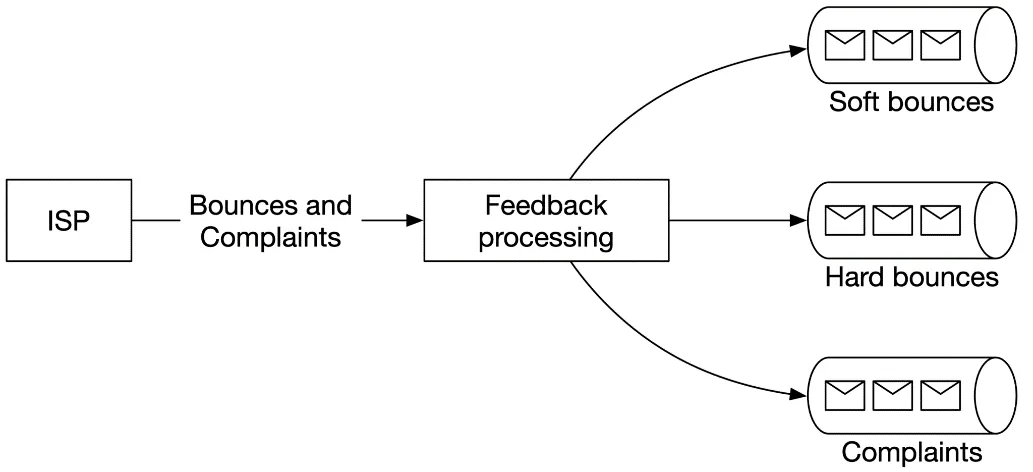
Figure 8: Handle feedback loop
| Outcome | Meaning |
|---|---|
| Hard bounce | Rejected: invalid recipient address |
| Soft bounce | Temporary failure (ISP busy) |
| Complaint | User clicked "report spam" |
Separate queues for each type.
- Email authentication: SPF, DKIM, DMARC combat phishing (93% of breaches are phishing/pretexting)
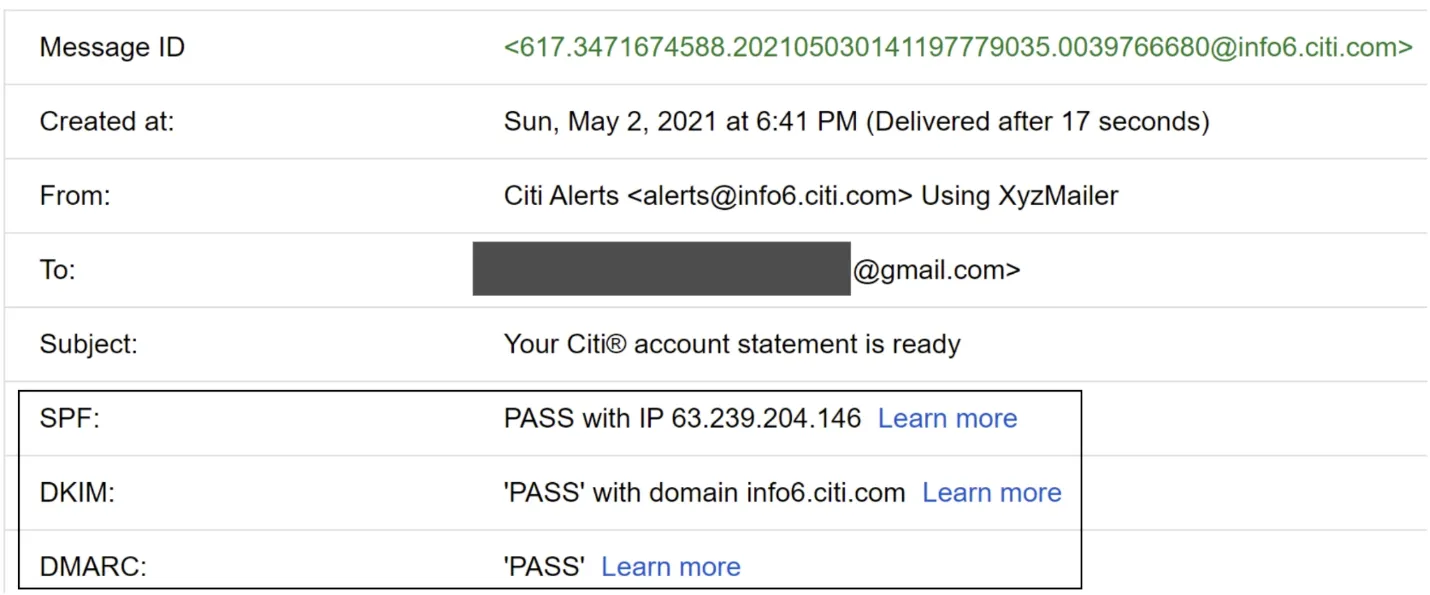
Figure 9: Gmail header example (SPF, DKIM, DMARC)
Search
Email search vs Google search:
| Aspect | Google Search | Email Search |
|---|---|---|
| Scope | Whole internet | User's own mailbox |
| Sorting | Relevance | Time, attachment, unread, date range |
| Accuracy | Indexing takes time | Near real-time, must be accurate |
Write-heavy (reindex on send/receive/delete). Read occurs only on explicit search.
Option 1: Elasticsearch
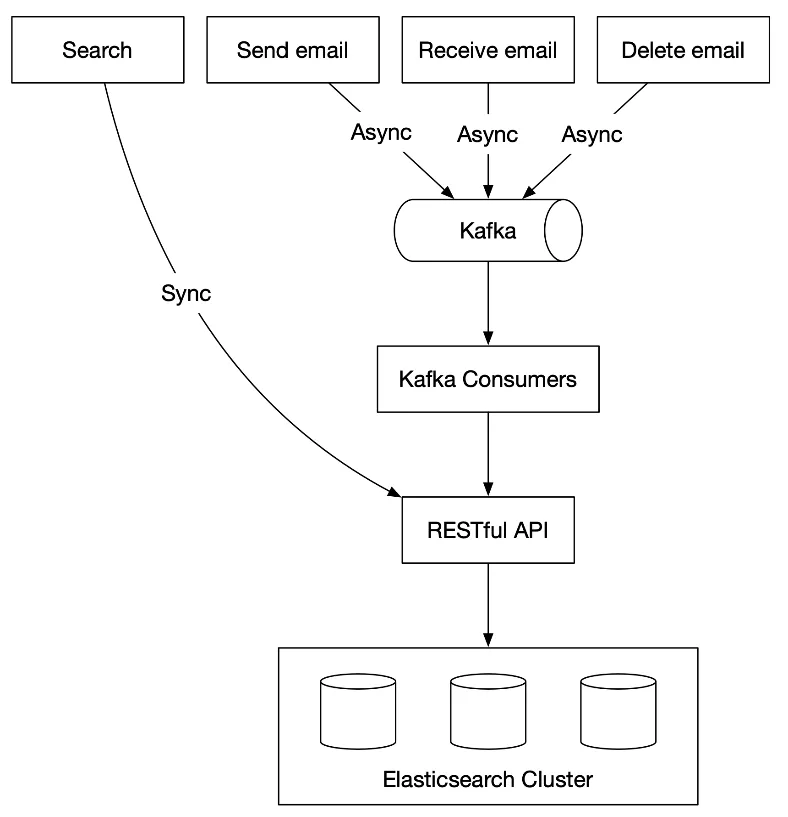
Figure 10: Elasticsearch
- Partition by
user_idto group a user's docs on the same node - Search: synchronous. Reindexing: offline via Kafka
- Challenge: keeping the primary store in sync with Elasticsearch
Option 2: Custom search engine
- Main bottleneck: disk I/O (PB-level daily metadata)
- Use an LSM tree (Log-Structured Merge-Tree) for the index: write path optimized via sequential writes. New email → level 0 in-memory cache → threshold → merge to the next level
- Separate frequently changing data (folders) from static data (emails)
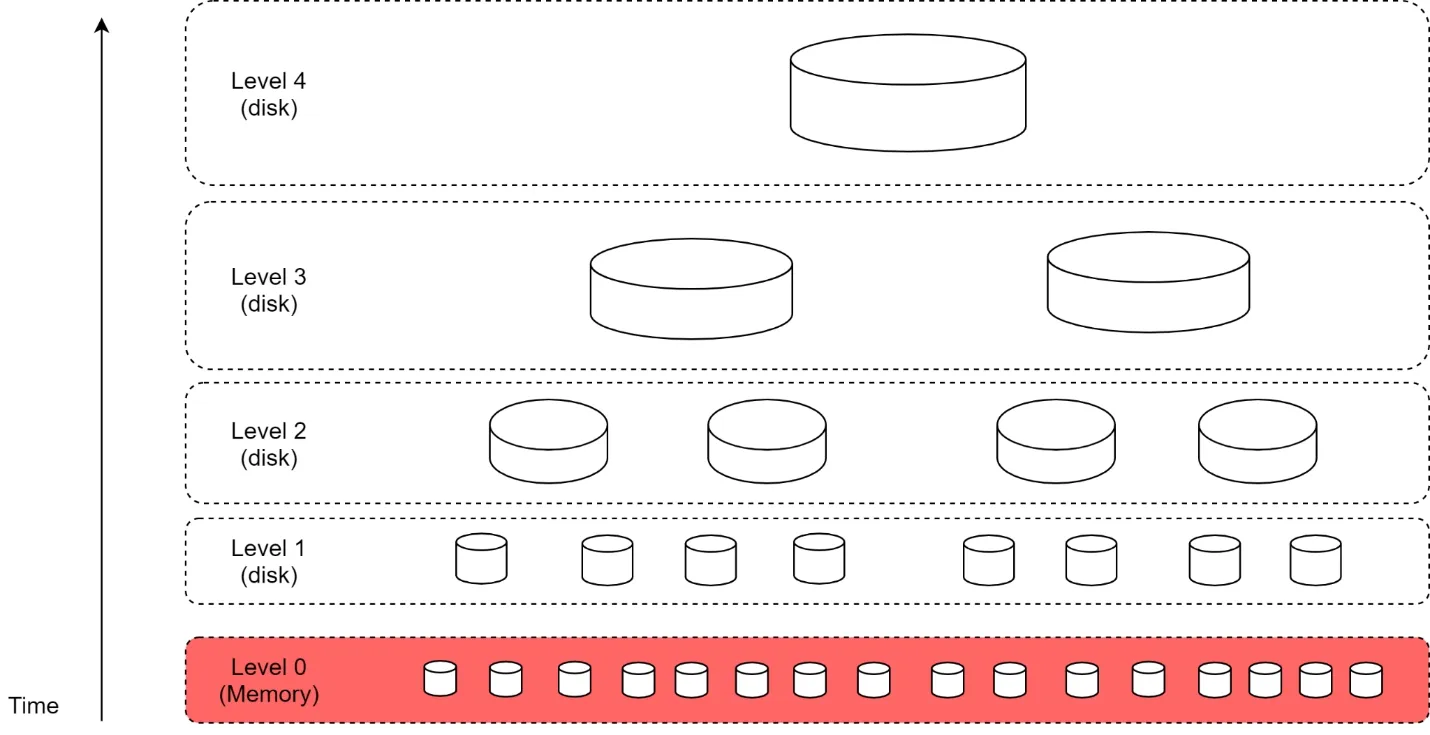
Figure 11: LSM tree
Comparison:
| Feature | Elasticsearch | Custom |
|---|---|---|
| Scalability | Scalable to some extent | Easier to optimize |
| Complexity | Two systems (datastore + ES) | One system |
| Data consistency | Two copies, hard to maintain | Single copy |
| Data loss | No (rebuildable from primary) | No |
| Development effort | Easy integration | Significant engineering |
Guideline: small scale → Elasticsearch; Gmail/Outlook scale → custom native search embedded in the DB.
Scalability and availability
Data replicated across multiple data centers. Users connect to the nearest server. Network partition → access from other DCs.
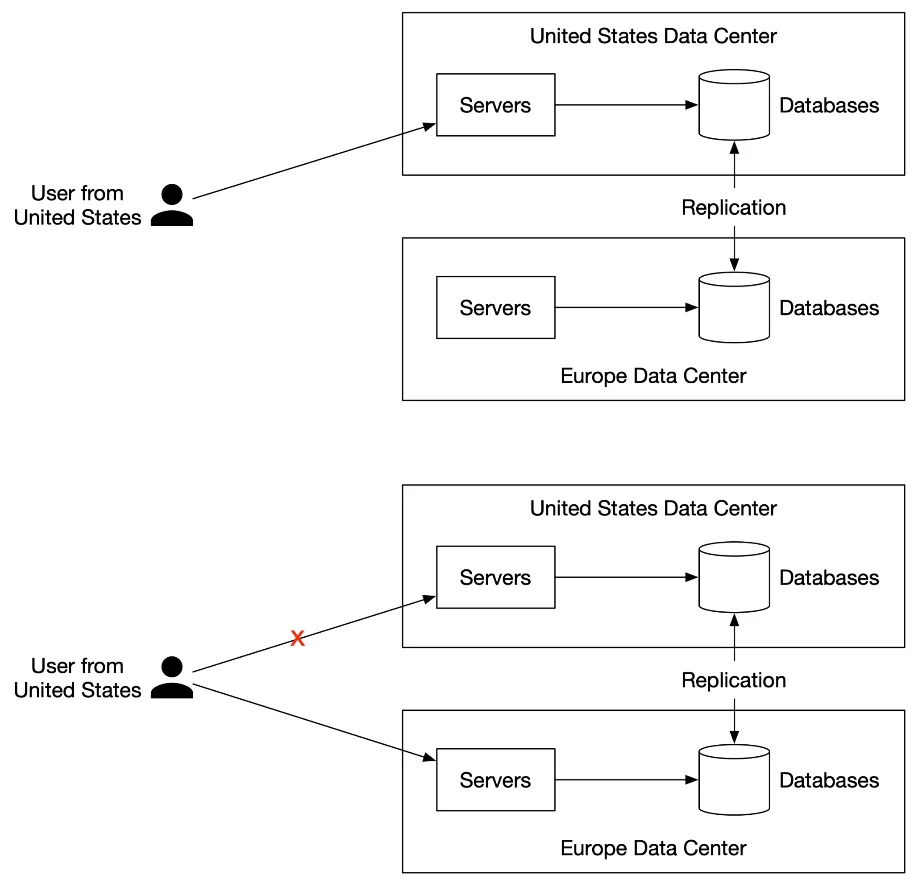
Figure 12: Multi-data center setup
Step 4 of 4: Wrap up
What we designed:
- Requirements → estimation → traditional vs distributed servers
- APIs → sending/receiving flows
- Metadata DB (NoSQL with denormalization)
- Deliverability
- Search (Elasticsearch vs LSM-based custom)
- Multi-DC scalability
Additional topics:
- Fault tolerance (node/network failures)
- Compliance (GDPR, PII, legal intercept)
- Security (phishing protection, encryption)
- Optimization (deduplicate attachments in group emails)
user_id-partitioned NoSQL + denormalized read/unread tables + LSM-tree search are the three deep-dive pillars.