S3-like Object Storage
9 min read- What it is: Amazon S3-style object storage: buckets, upload/download, versioning, listing; 100 PB/yr
- Durability: 6 nines (replication 3×) or 11 nines (erasure coding 8+4, 50% overhead vs 200%)
- Core split: metadata store (object name → UUID) + data store (UUID → payload), like inode vs disk blocks
- Data store: placement service (virtual cluster map) → data nodes; small objects merged into big WAL-like files; SQLite per node for object→file mapping
- Metadata: shard by
hash(bucket, object); denormalize listing into abucket_id-sharded table - Versioning: new row per version (TIMEUUID), delete = delete marker; multipart upload + compaction GC
Design object storage similar to Amazon S3. S3 launched 2006; 100+ trillion objects by 2021.
Storage system 101
| Block Storage | File Storage | Object Storage | |
|---|---|---|---|
| Mutable | Yes | Yes | No (versioning, not in-place) |
| Cost | High | Med-High | Low |
| Performance | Med-Very High | Med-High | Low-Med |
| Consistency | Strong | Strong | Strong |
| Access | SAS/iSCSI/FC | CIFS/SMB, NFS | RESTful API |
| Scalability | Medium | High | Vast |
| Best for | VMs, DBs | General file access | Binary/unstructured data |
- Block: raw blocks as volumes, physically or network-attached (FC, iSCSI). Single-server ownership
- File: built on block storage, hierarchical directories, shared via SMB/NFS
- Object: flat structure, RESTful API, "cold" data, archival/backup. Sacrifices performance for durability + scale + low cost
Terminology:
- Bucket: logical container, globally unique name
- Object: payload + metadata (name-value pairs)
- Versioning: multiple variants of an object in a bucket
- URI: uniquely identifies resources
- SLA: e.g. S3 Standard-IA: 99.999999999% durability, 99.9% availability
Step 1 of 4: Understand the problem and establish design scope
Goal: lock in requirements and scale.
Requirements:
- Bucket creation, object upload/download, versioning, listing objects in a bucket
- Both massive objects (few GBs+) and many small objects (tens of KBs)
- 100 PB data per year
- Durability: 6 nines (99.9999%), availability: 4 nines (99.99%)
- Storage efficiency (reduce costs while maintaining reliability/performance)
Back-of-the-envelope estimation:
- Object distribution: 20% small (<1MB), 60% medium (1-64MB), 20% large (>64MB)
- HDD: 100-150 IOPS (7200 rpm SATA)
- Using median sizes (0.5MB, 32MB, 200MB), 40% storage usage:
- 100 PB → 10¹¹ MB
- ~0.68 billion objects
- Metadata ~1KB each → 0.68 TB metadata
Step 2 of 4: Propose high-level design and get buy-in
Goal: agree on the metadata/data store split.
Key properties:
- Object immutability: no incremental changes; replace with a new version
- Key-value store: URI = key, object data = value
- Write once, read many: 95% of requests are reads (LinkedIn)
- Support both small and large objects
Analogy: like the UNIX file system: inode (metadata) separate from file data (disk blocks). Object storage: metadata store (object metadata) + data store (object data), connected via object UUID over the network.
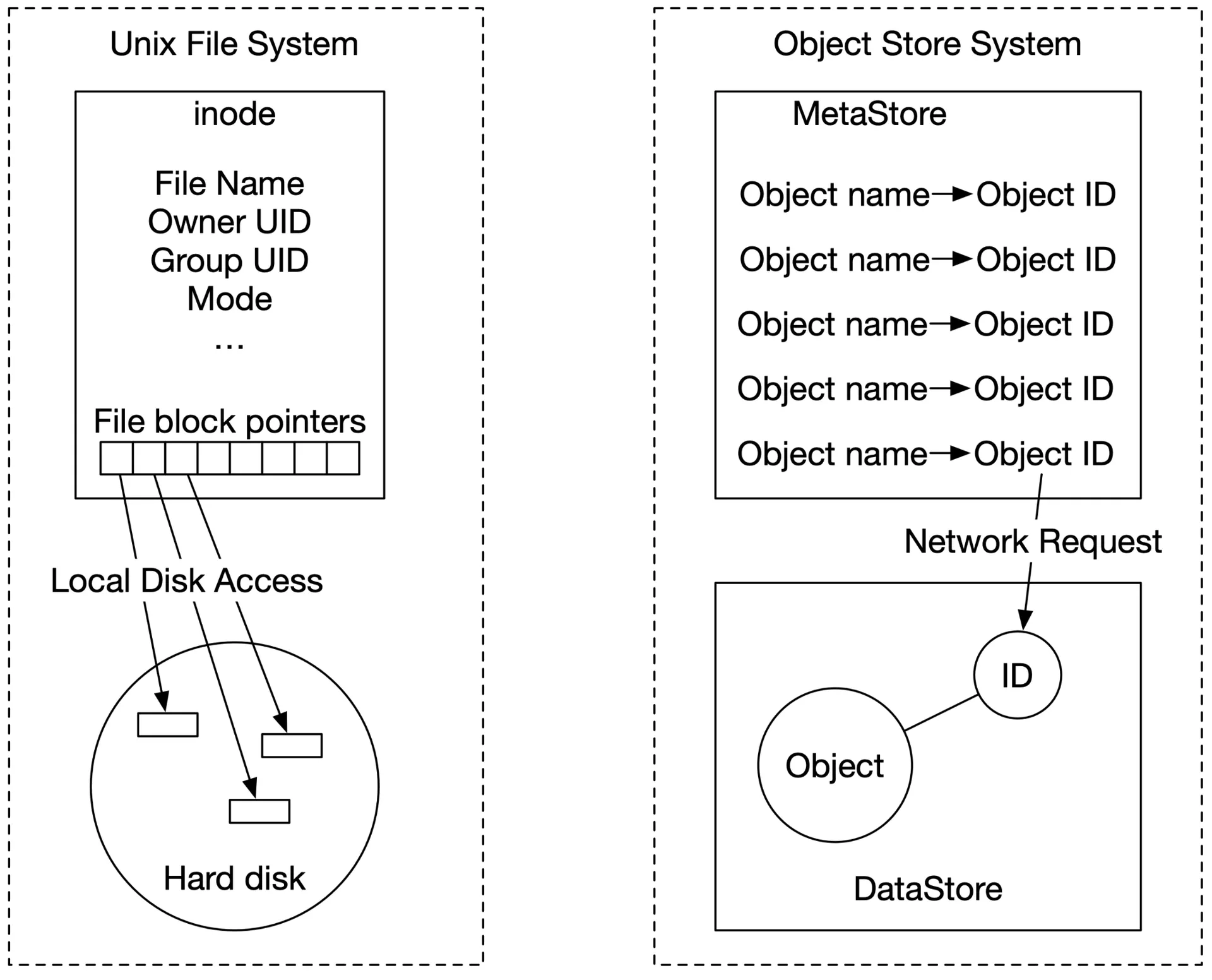
Figure 2: Unix file system and object store
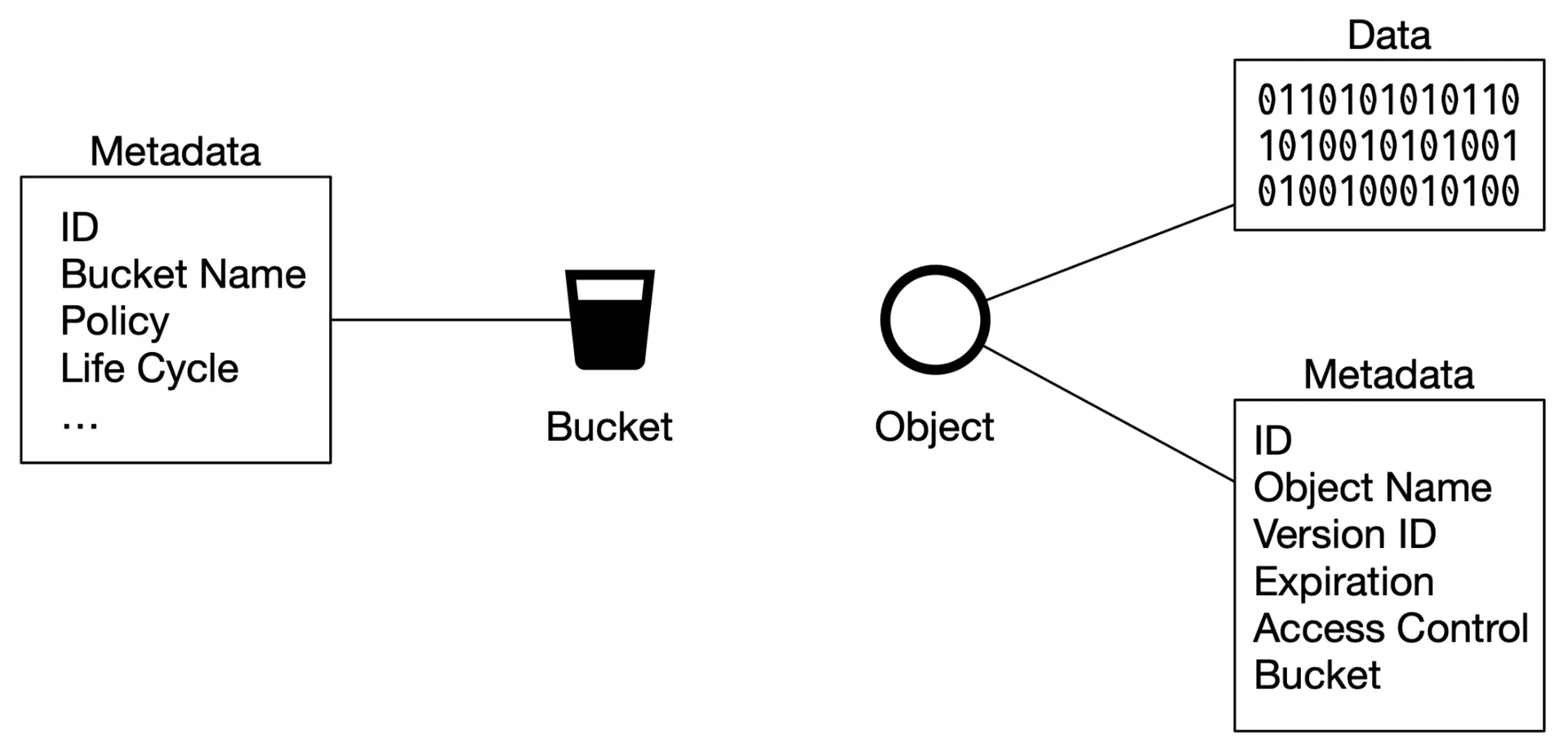
Figure 3: Bucket & object
High-level design
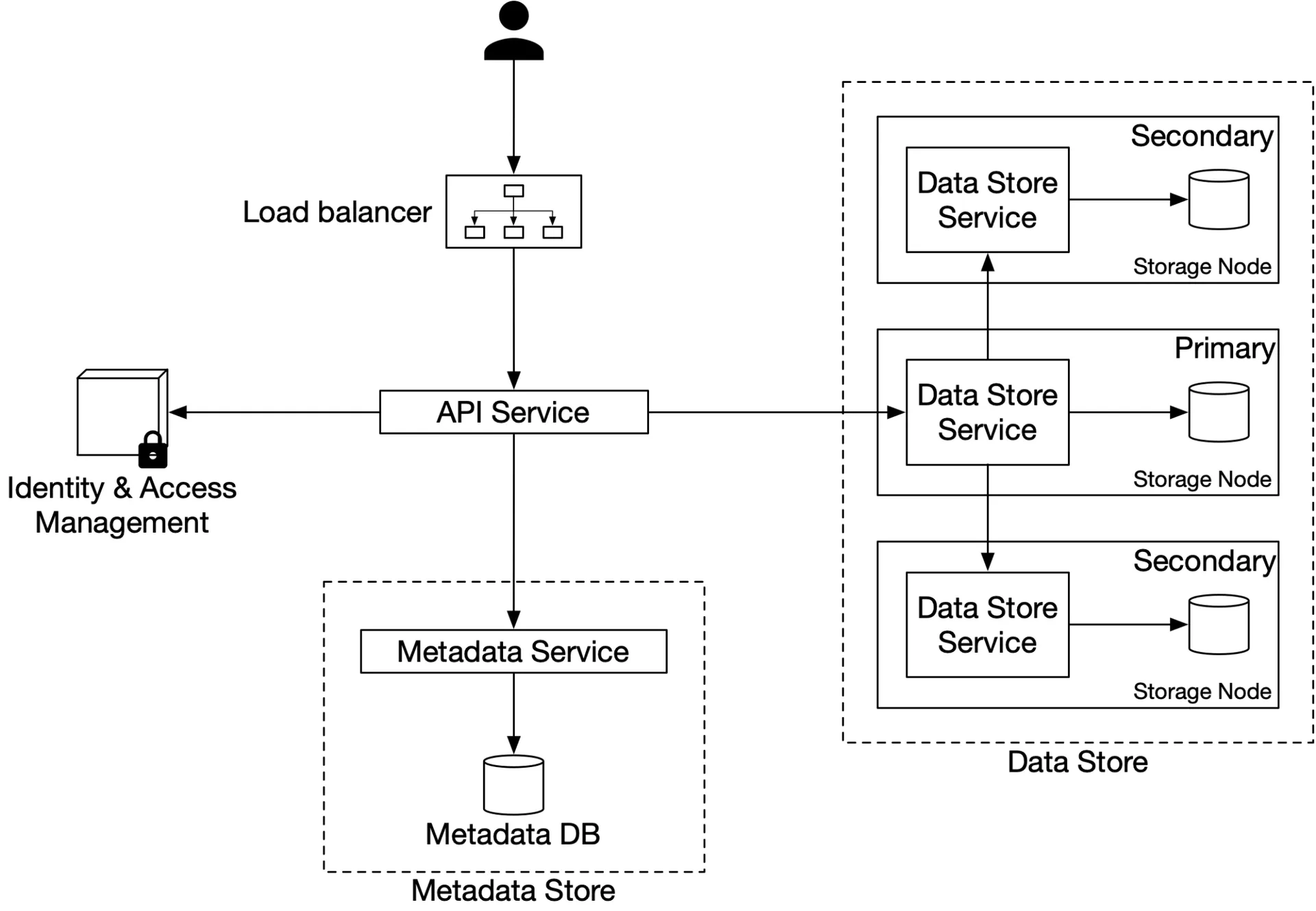
Figure 4: High-level design
- Load balancer: distributes RESTful API requests
- API service: stateless, orchestrates IAM + metadata + data store calls
- IAM: authentication + authorization
- Data store: stores/retrieves object data by UUID
- Metadata store: stores object metadata
Uploading an object
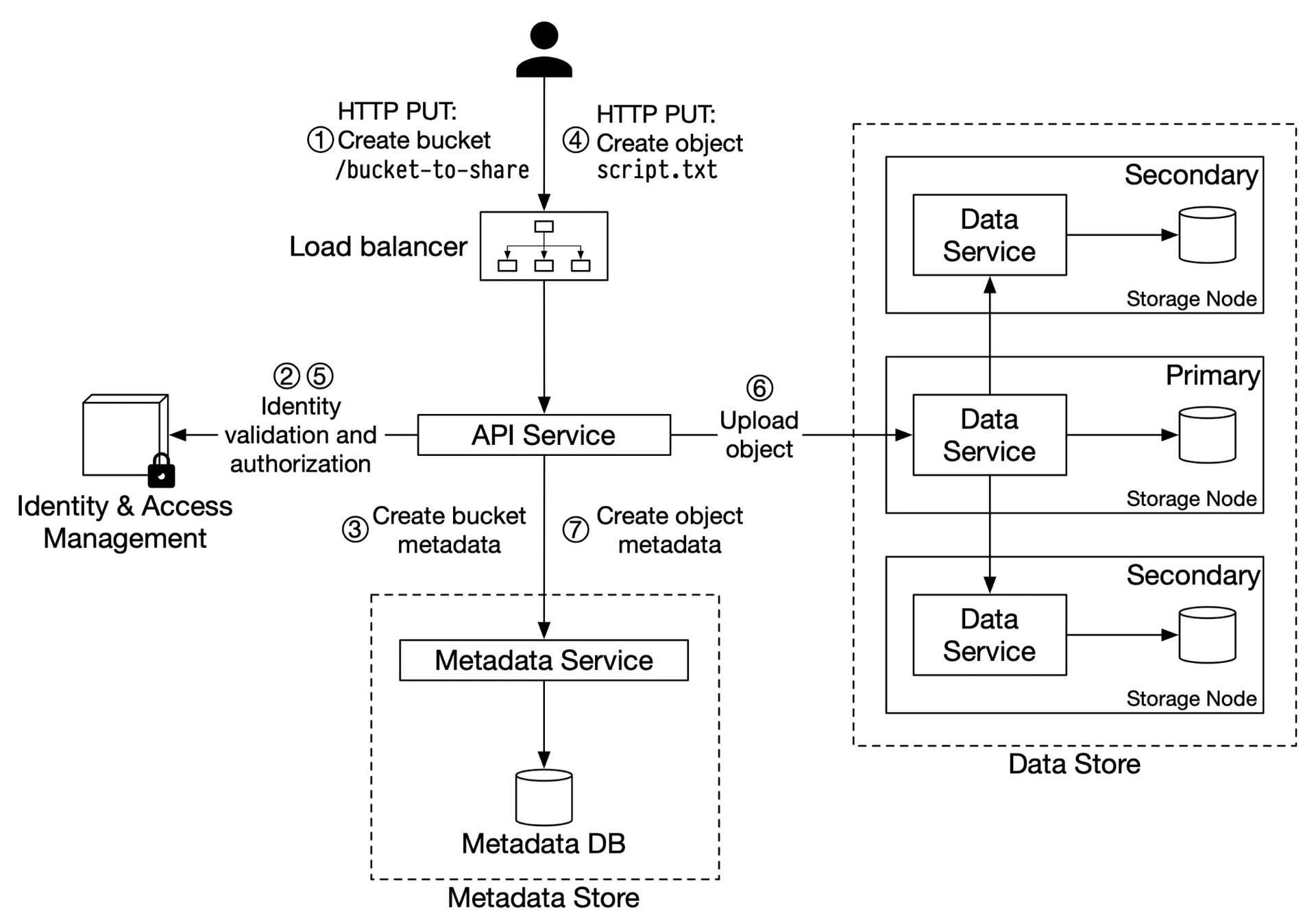
Figure 5: Uploading an object
- Client:
PUTto create bucket → API service - API → IAM: verify WRITE permission
- API → metadata store: create bucket entry
- Client:
PUTto create objectscript.txt - API → IAM: verify WRITE on bucket
- API → data store: persist payload → returns UUID
- API → metadata store: create entry (object_name, object_id/UUID, bucket_id)
Sample upload request:
PUT /bucket-to-share/script.txt HTTP/1.1
Host: foo.s3example.org
Authorization: authorization string
Content-Type: text/plain
Content-Length: 4567
x-amz-meta-author: Alex
[4567 bytes of object data]
Downloading an object
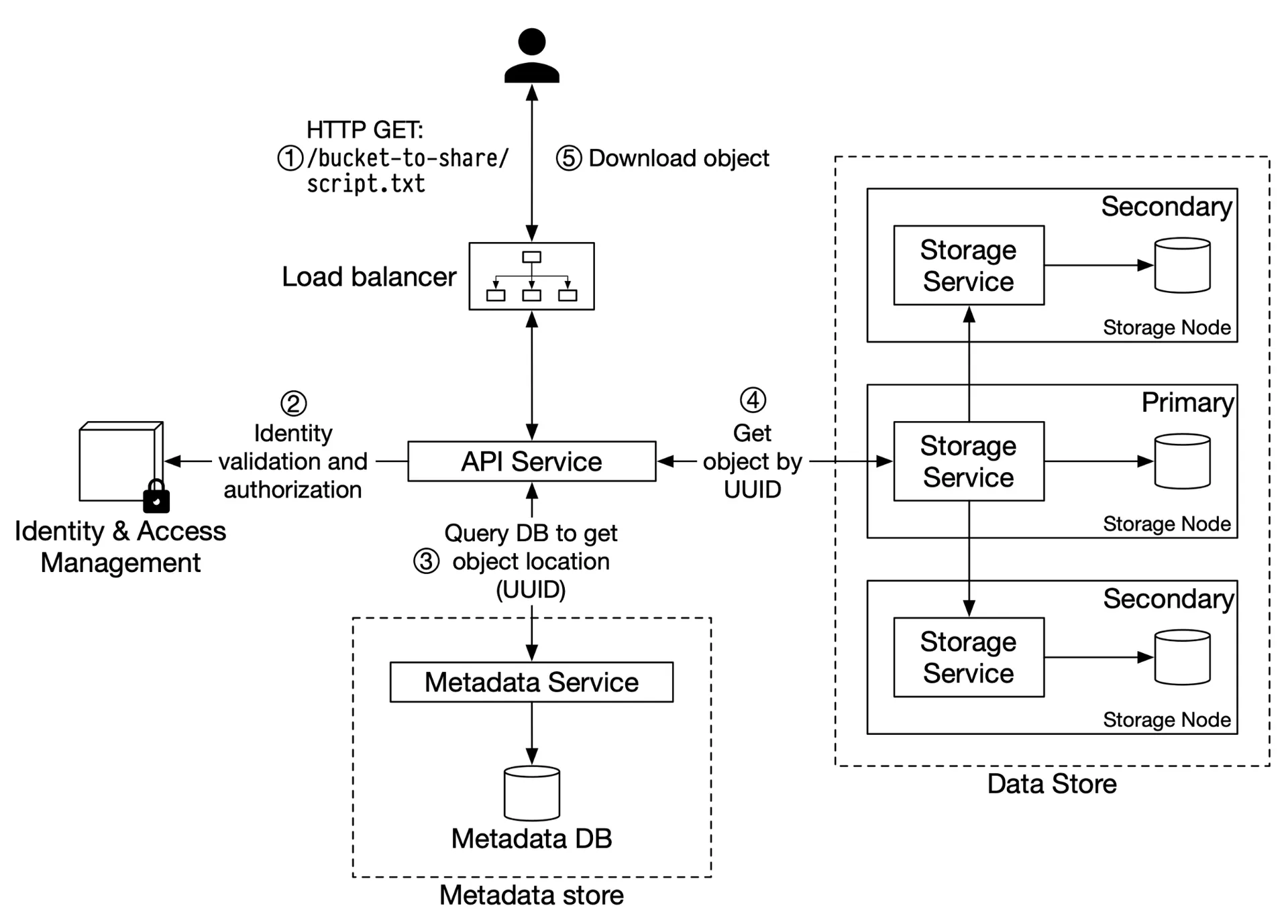
Figure 6: Downloading an object
- Client:
GET /bucket-to-share/script.txt - API → IAM: verify READ access
- API → metadata store: fetch UUID by object name
- API → data store: fetch data by UUID
- Return object data to client
Logical hierarchy via naming: bucket-to-share/script.txt implies a folder structure (no actual directories).
Step 3 of 4: Design deep dive
Goal: data store internals, durability, metadata, versioning, large uploads, GC.
Data store
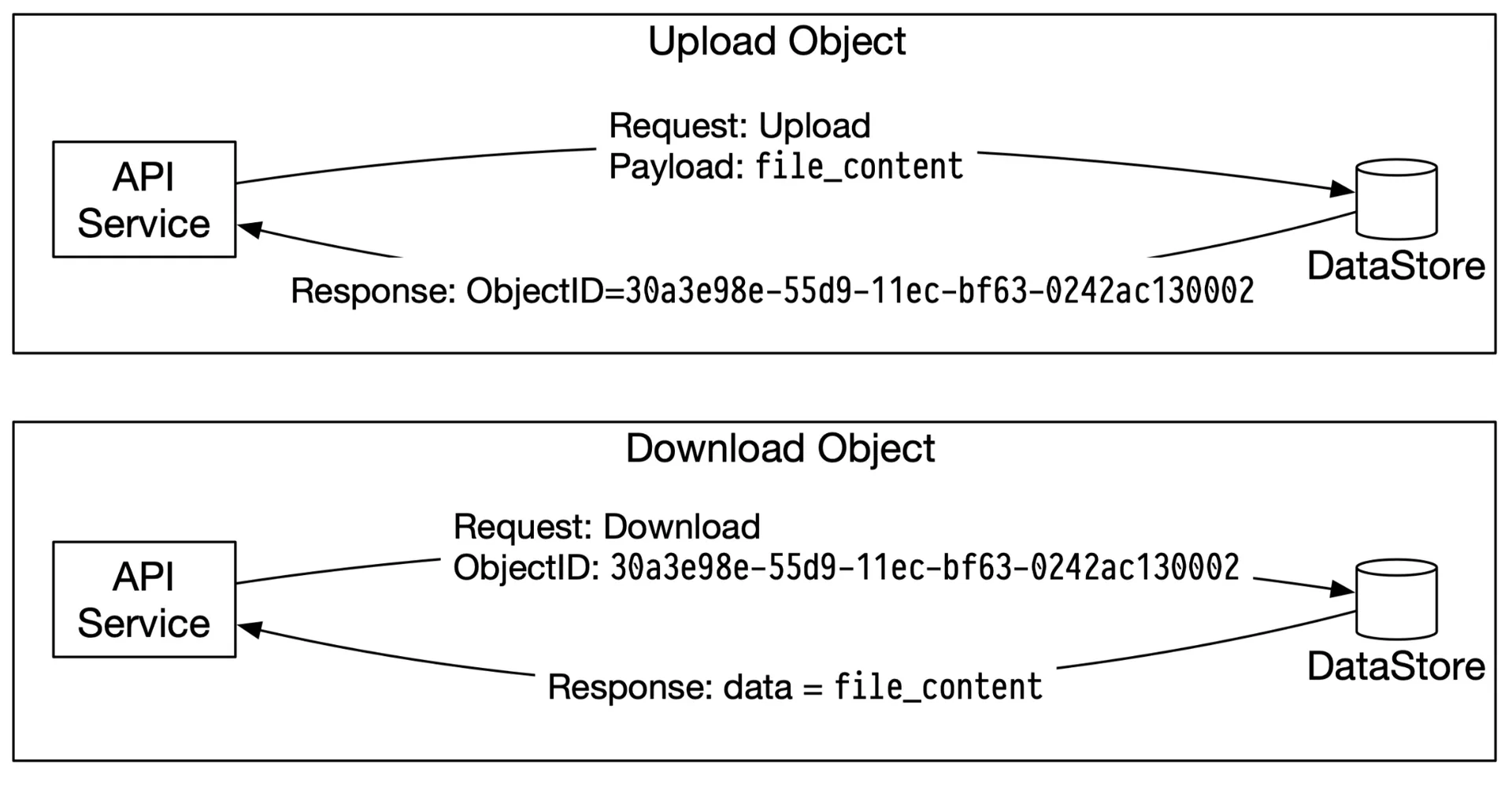
Figure 7: Upload and download an object
Data store components:
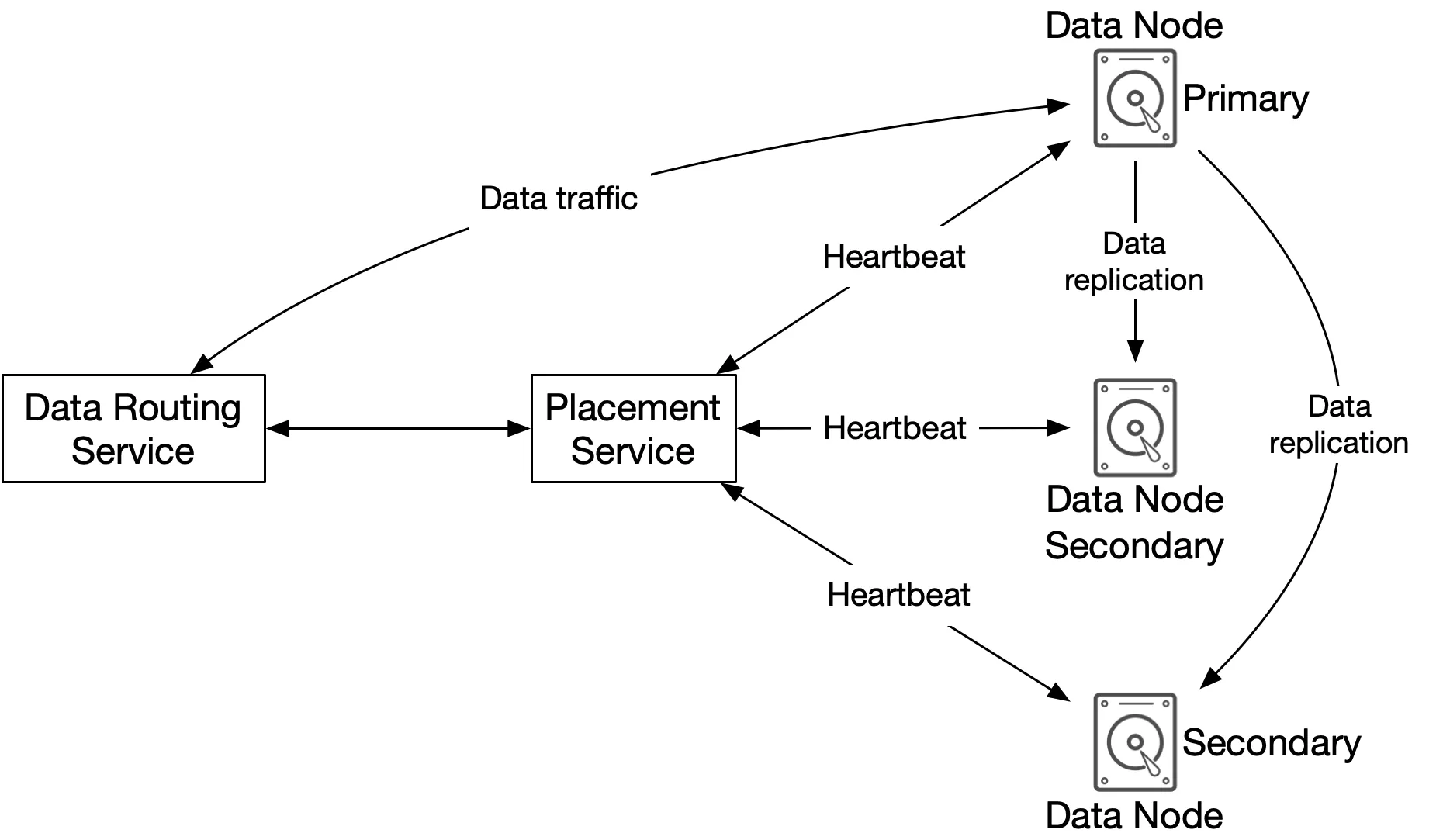
Figure 8: Data store components
- Data routing service: stateless RESTful/gRPC service. Queries the placement service for the best data node; reads/writes data to nodes
- Placement service: determines which data nodes (primary + replicas) store an object. Maintains a virtual cluster map (physical topology). Ensures replicas are physically separated for durability. Monitors nodes via heartbeats (15s grace period). Critical → 5-7 nodes with Paxos/Raft consensus (tolerates minority failure)
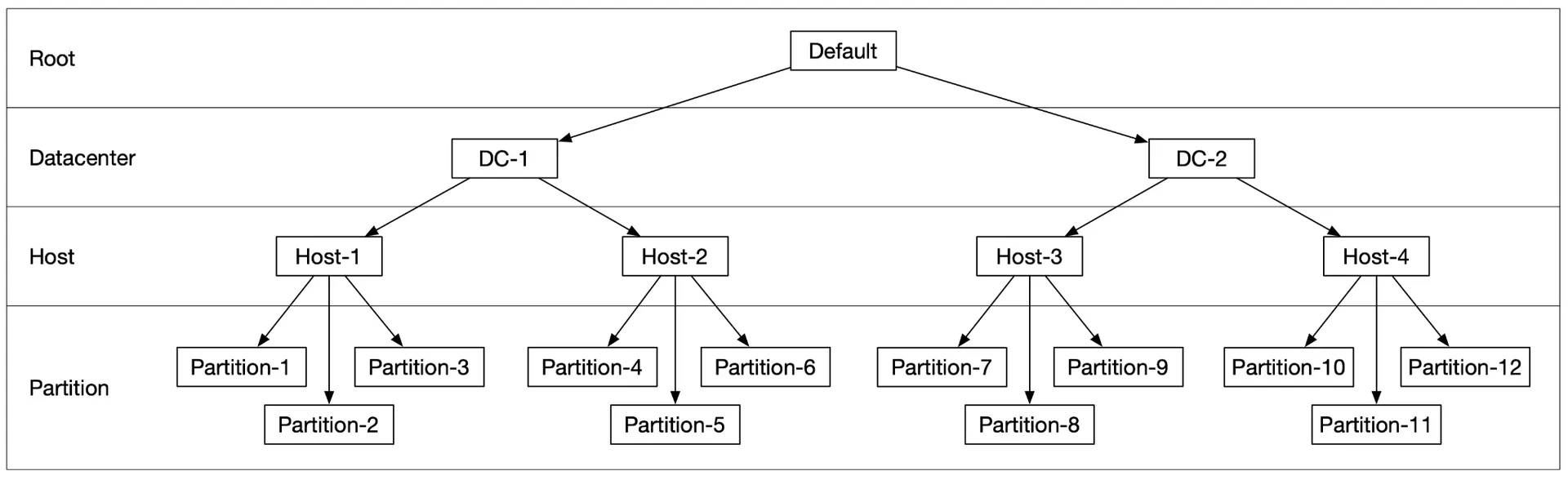
Figure 9: Virtual cluster map
- Data node: stores actual object data. Replicates to multiple nodes (replication group). Daemon sends heartbeats (how many drives, how much data). On first heartbeat, placement assigns: unique ID, virtual cluster map, replication targets
Data persistence flow:
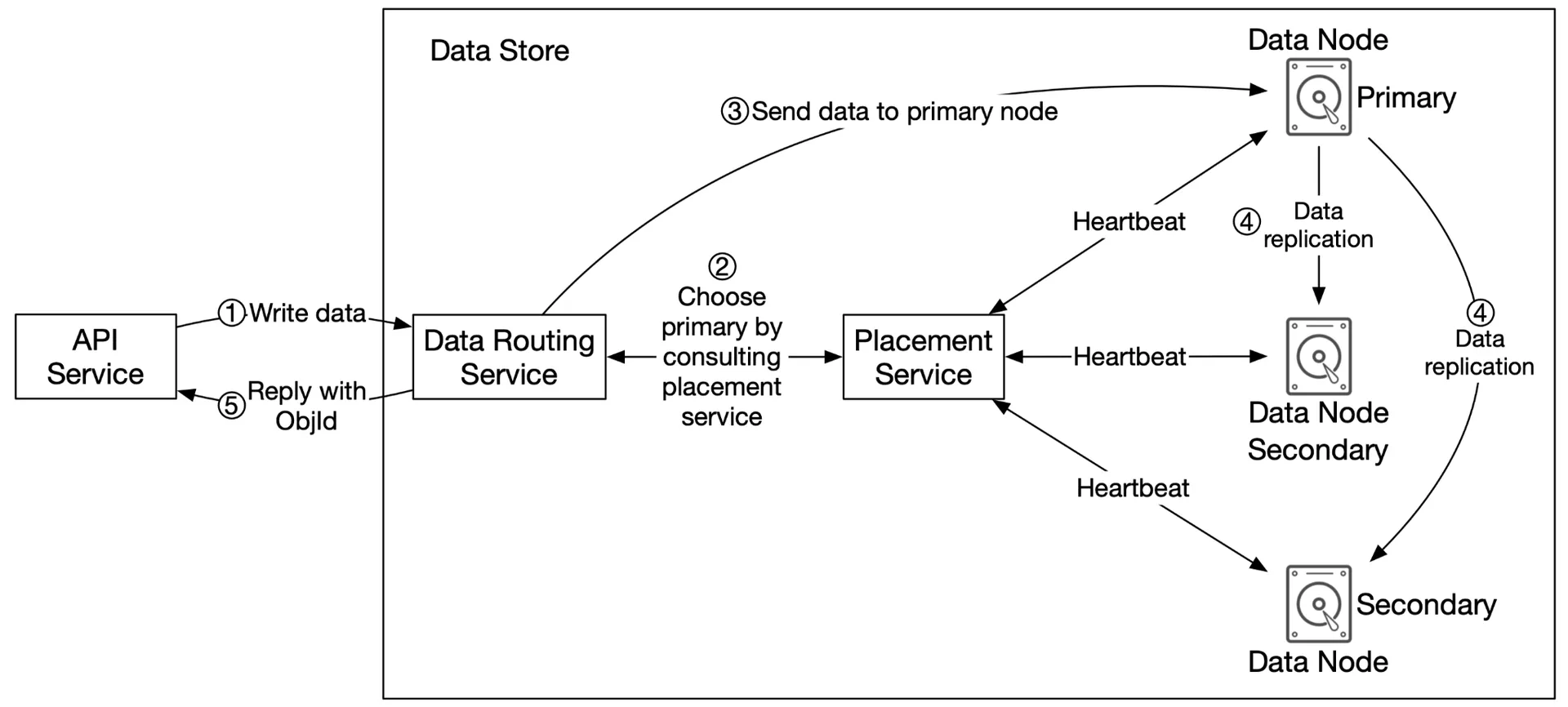
Figure 10: Data persistence flow
- API → data store: forward object data
- Data routing: generate UUID, query placement → get primary data node (via consistent hashing)
- Send data to primary + UUID
- Primary saves locally → replicates to 2 secondary nodes → responds only after all replicas succeed
- Return UUID to API service
Consistency vs latency trade-off:
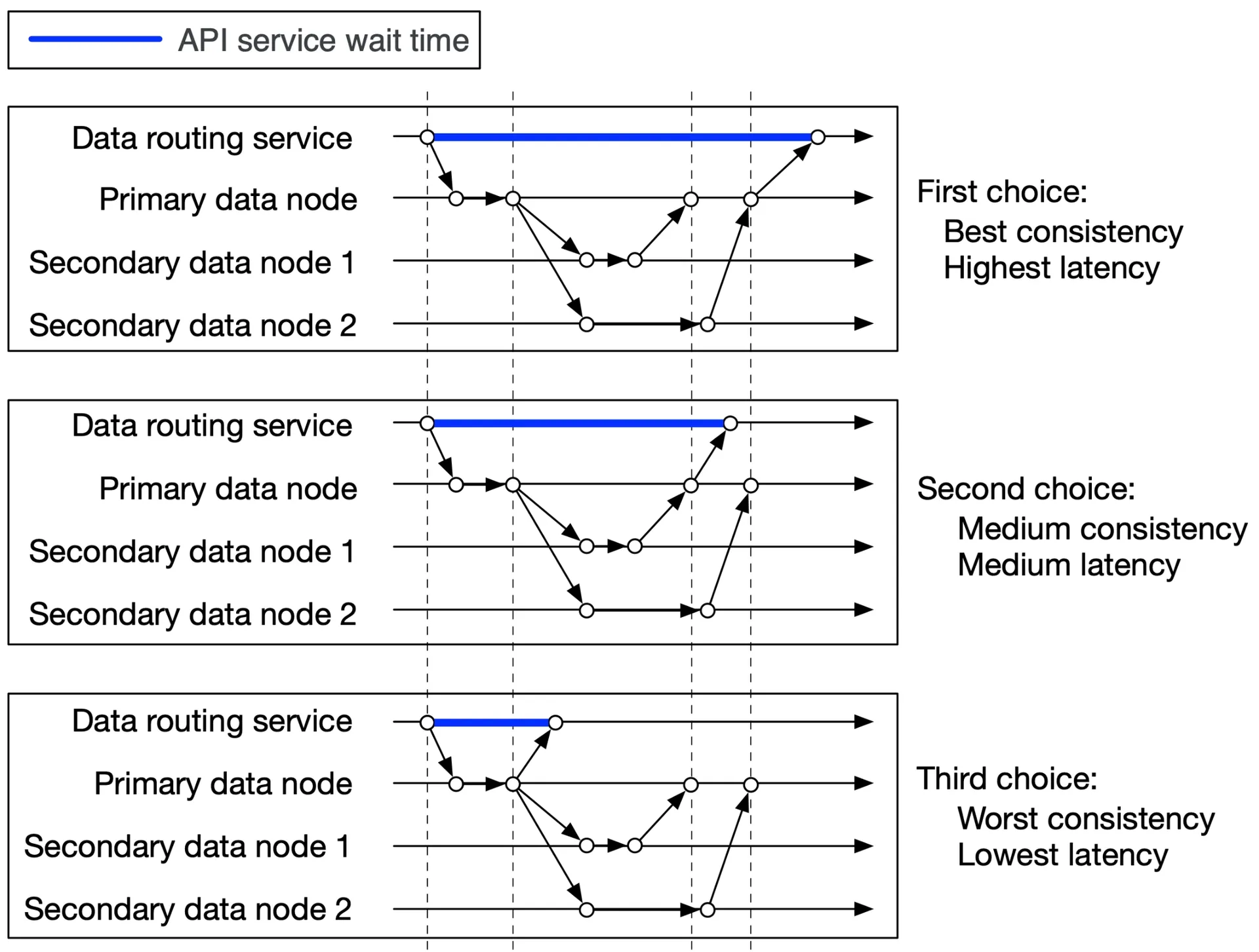
Figure 11: Consistency vs latency
- All 3 nodes: best consistency, highest latency
- Primary + 1 secondary: medium consistency/latency (eventual)
- Primary only: worst consistency, lowest latency (eventual)
How data is organized:
Storing each object as a separate file fails at scale:
- Wastes disk blocks (4KB block for a tiny file)
- Exhausts inode capacity
- OS handles millions of inodes poorly
Solution: merge small objects into larger files (WAL-like). Append to a read-write file. At capacity (~few GBs) → mark read-only, create a new read-write file. Serialize writes to the read-write file. For multi-core servers: a dedicated read-write file per core.
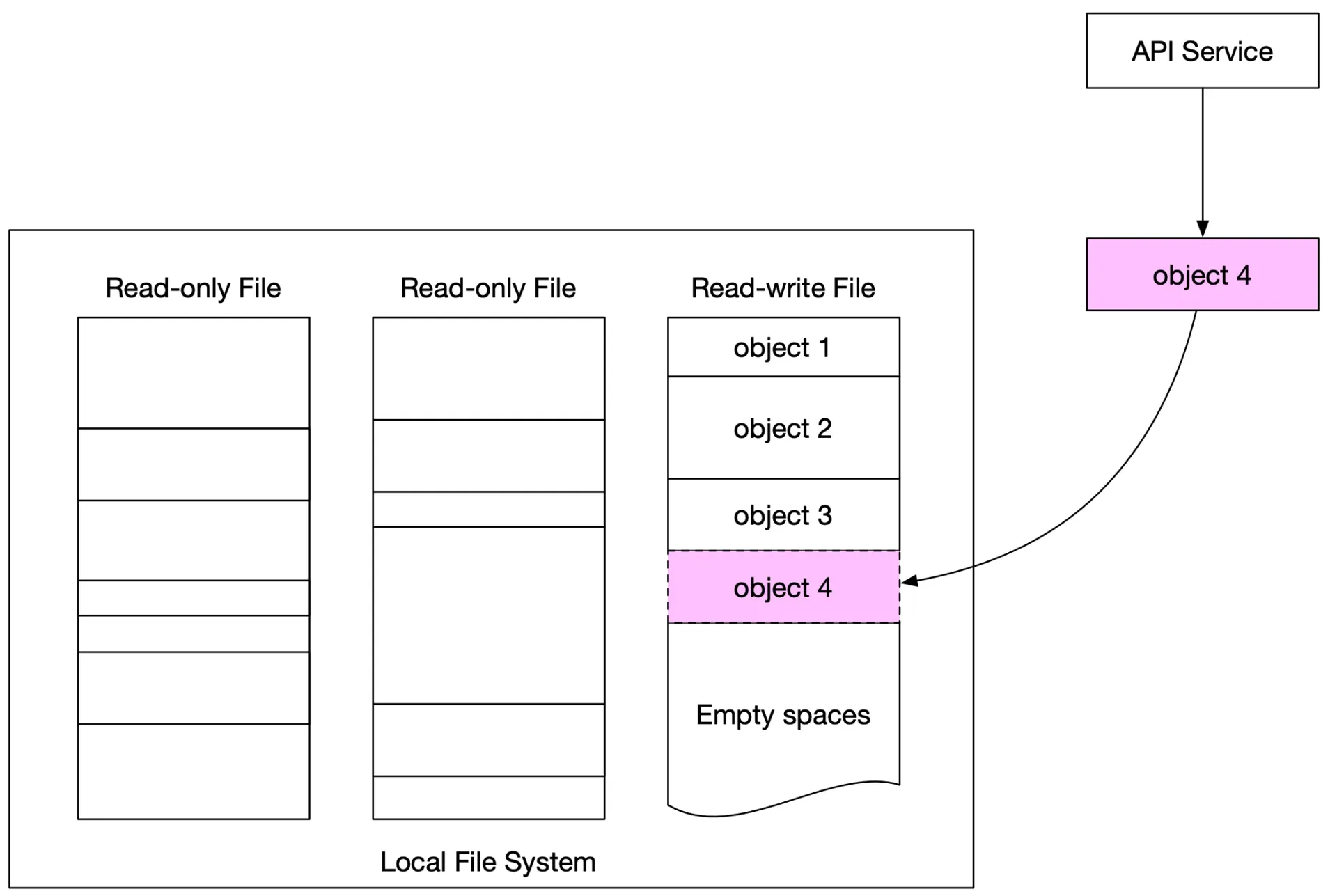
Figure 12: Store multiple small objects in one big file
Object lookup:
To locate an object by UUID: need data file name, start offset, object size.
| Field | Description |
|---|---|
| object_id | UUID |
| file_name | Name of containing file |
| start_offset | Beginning address in file |
| object_size | Number of bytes |
Database choice: read-heavy (write once, read many). RocksDB (SSTable-based, fast writes) vs Relational (B+ tree, fast reads). Relational wins (better read perf). Deploy SQLite per data node (local, file-based, isolated per node).
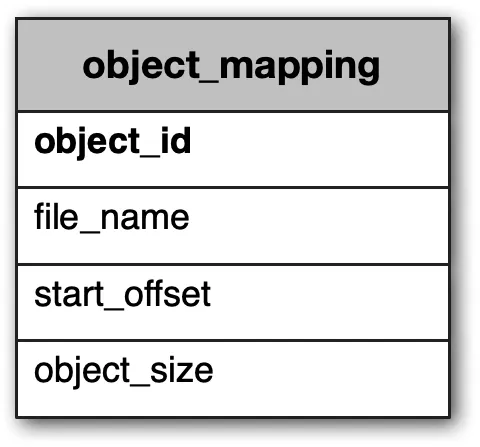
Tables 3-4: Object_mapping table
Updated persistence flow:
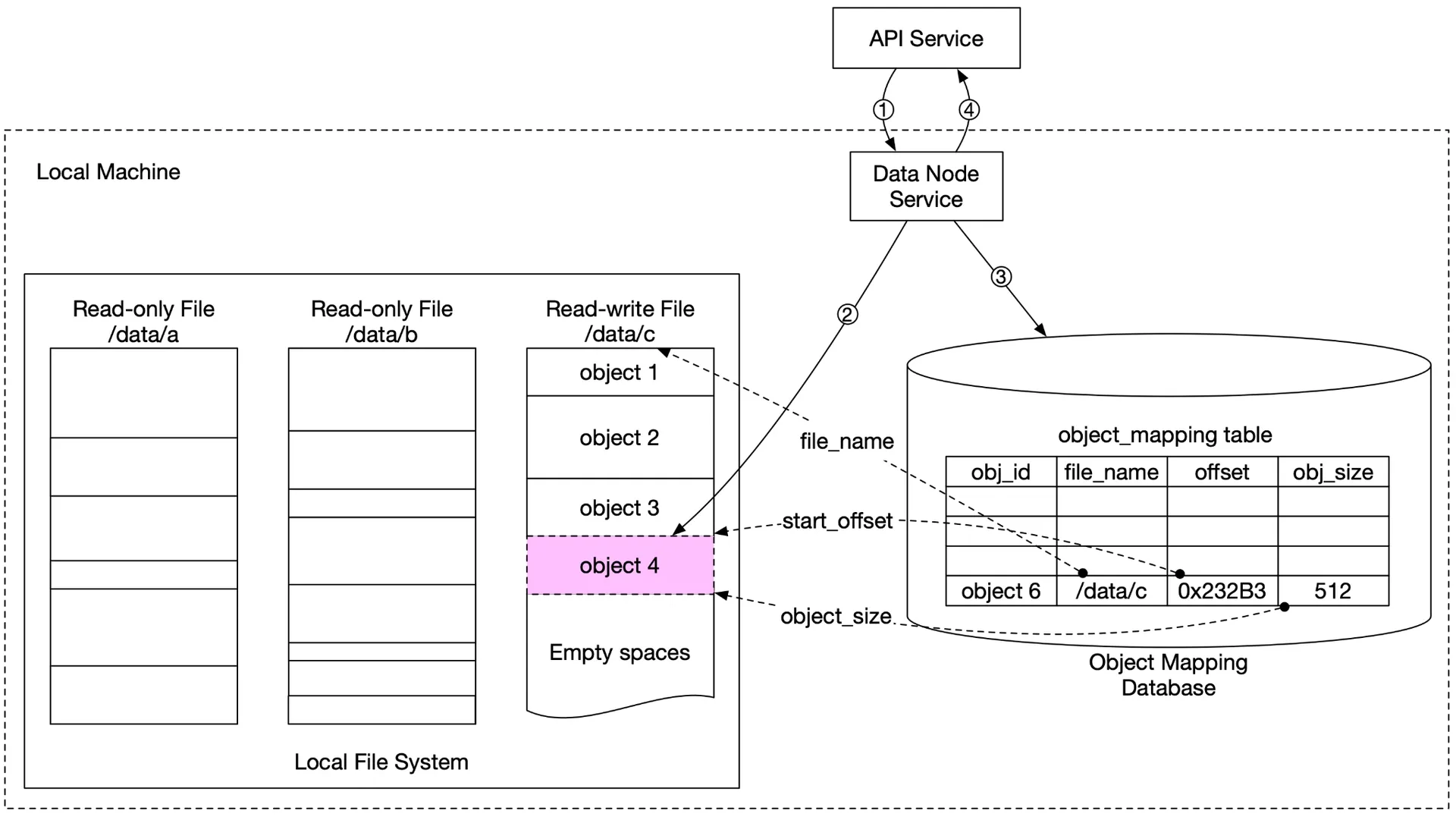
Figure 13: Updated data persistence flow
- API sends object 4
- Data node appends to
/data/c - Insert record into
object_mappingtable - Return UUID
Durability
Hardware failure & failure domains:
- Annual disk failure rate: ~0.81%. 3 copies → 1-(0.0081³) ≈ 99.9999% reliability
- Failure domains: node-level (server components), rack-level (shared switches/power), AZ-level (separate infrastructure)
- Replicate data across AZs for extreme-case resilience
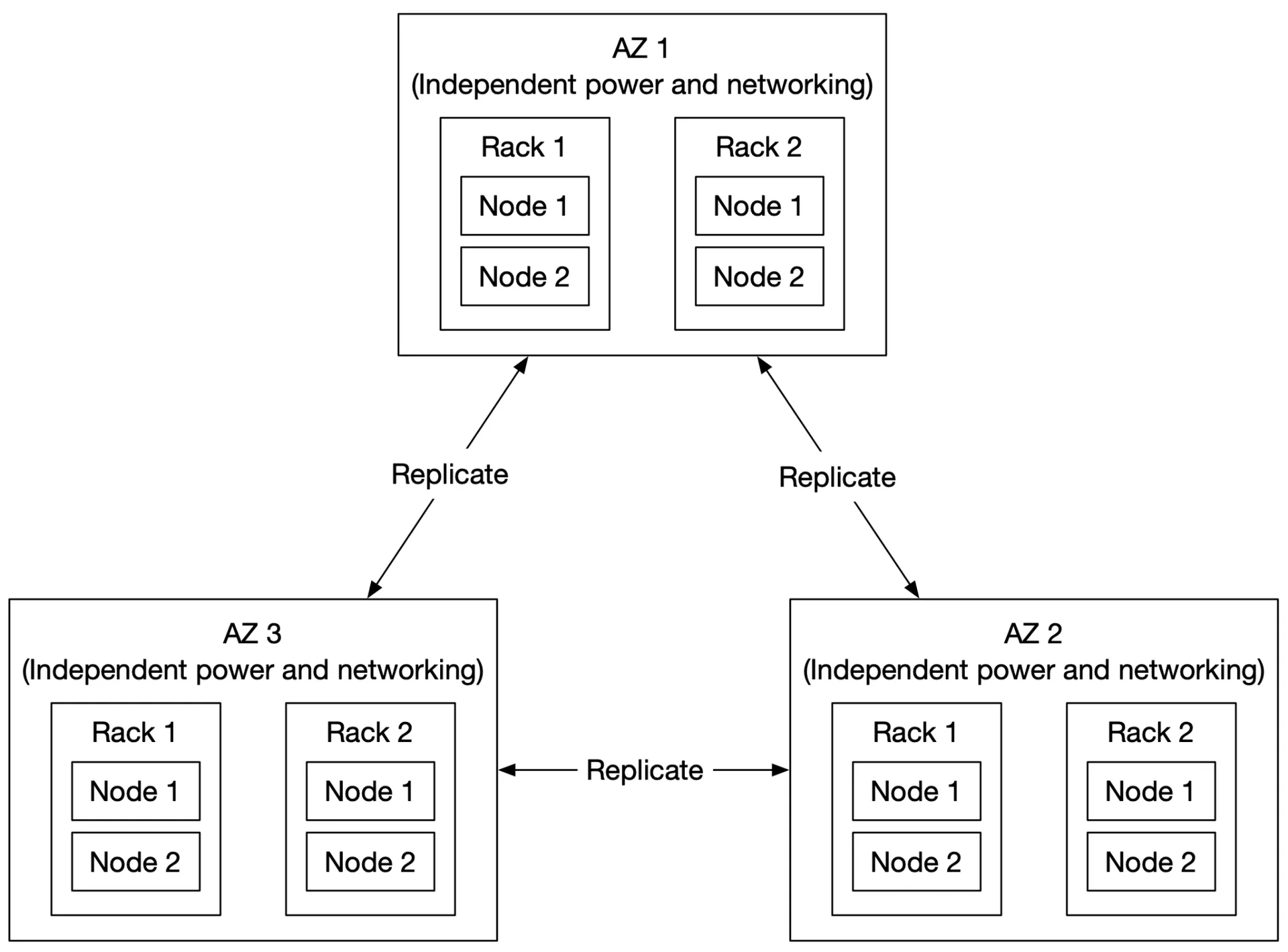
Figure 14: Multi-datacenter replication
Erasure coding:
Alternative to replication. (4+2) example: data split into 4 equal chunks (d1-d4), 2 parities (p1, p2) computed mathematically. Lose d3, d4 → reconstruct from d1, d2, p1, p2.
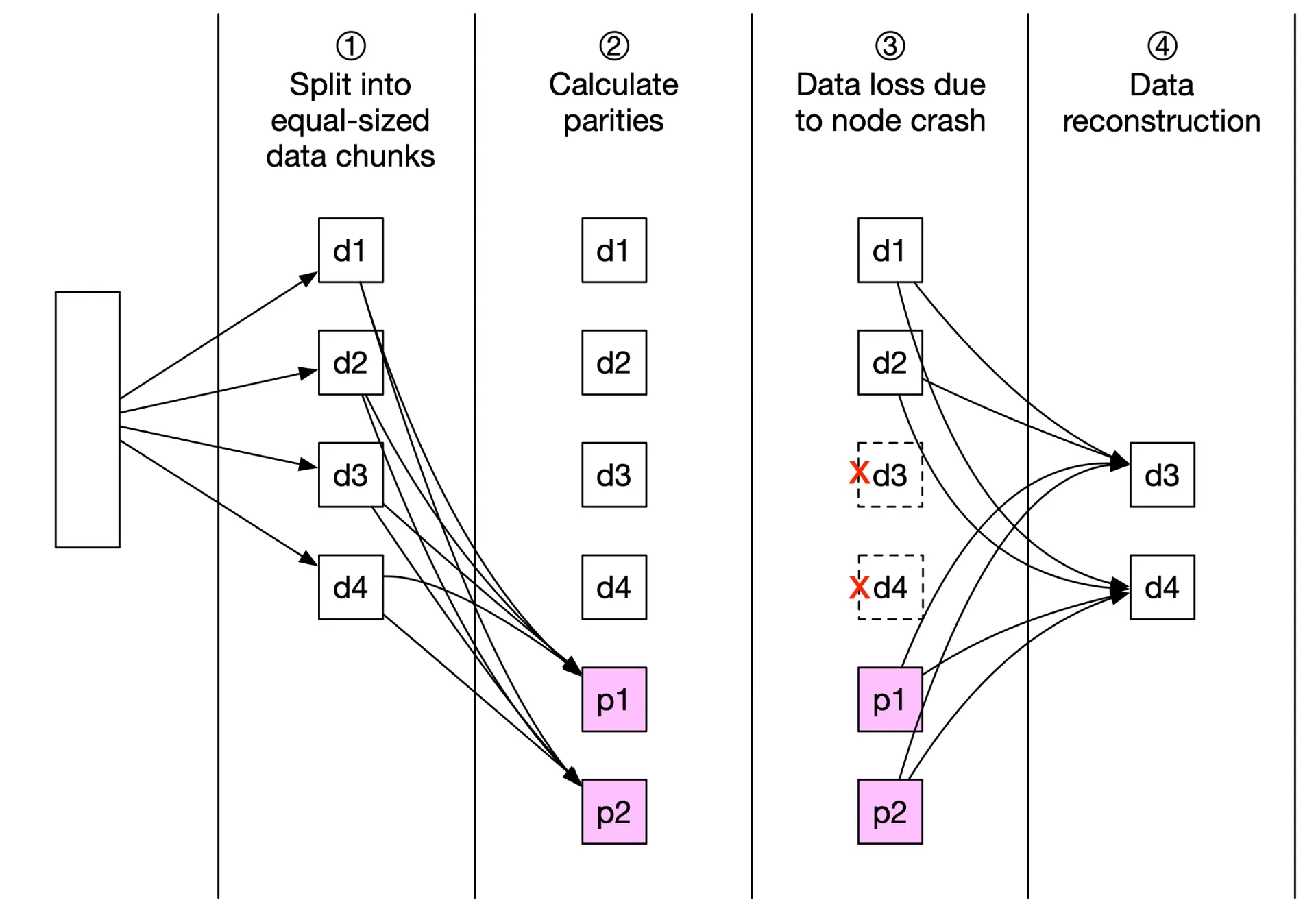
Figure 15: Erasure coding
(8+4): 8 data chunks + 4 parities across 12 failure domains. Can lose up to 4 nodes and reconstruct.
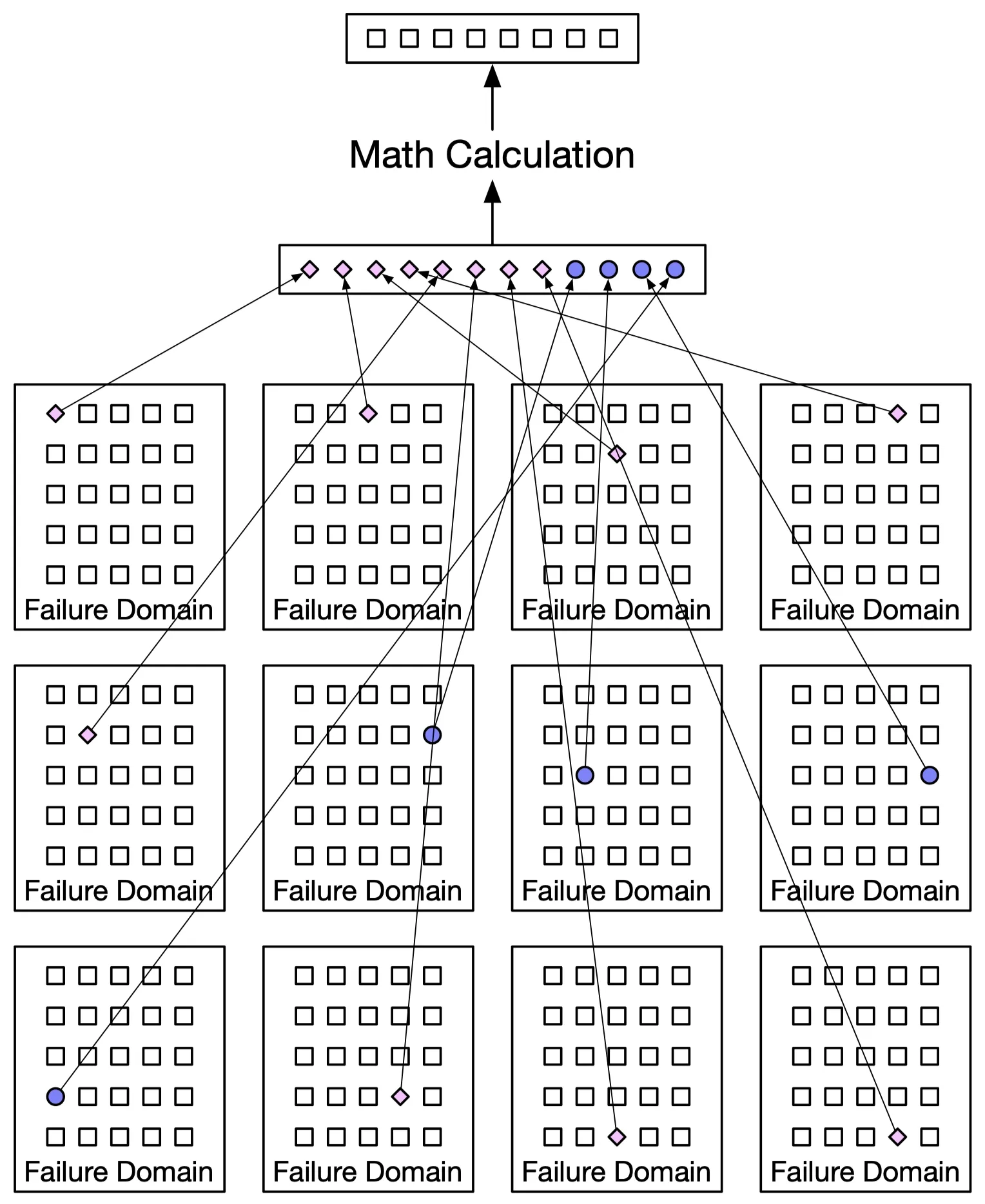
Figure 16: (8+4) erasure coding
Storage overhead: replication 3× → 200%. Erasure coding (8+4) → 50%.
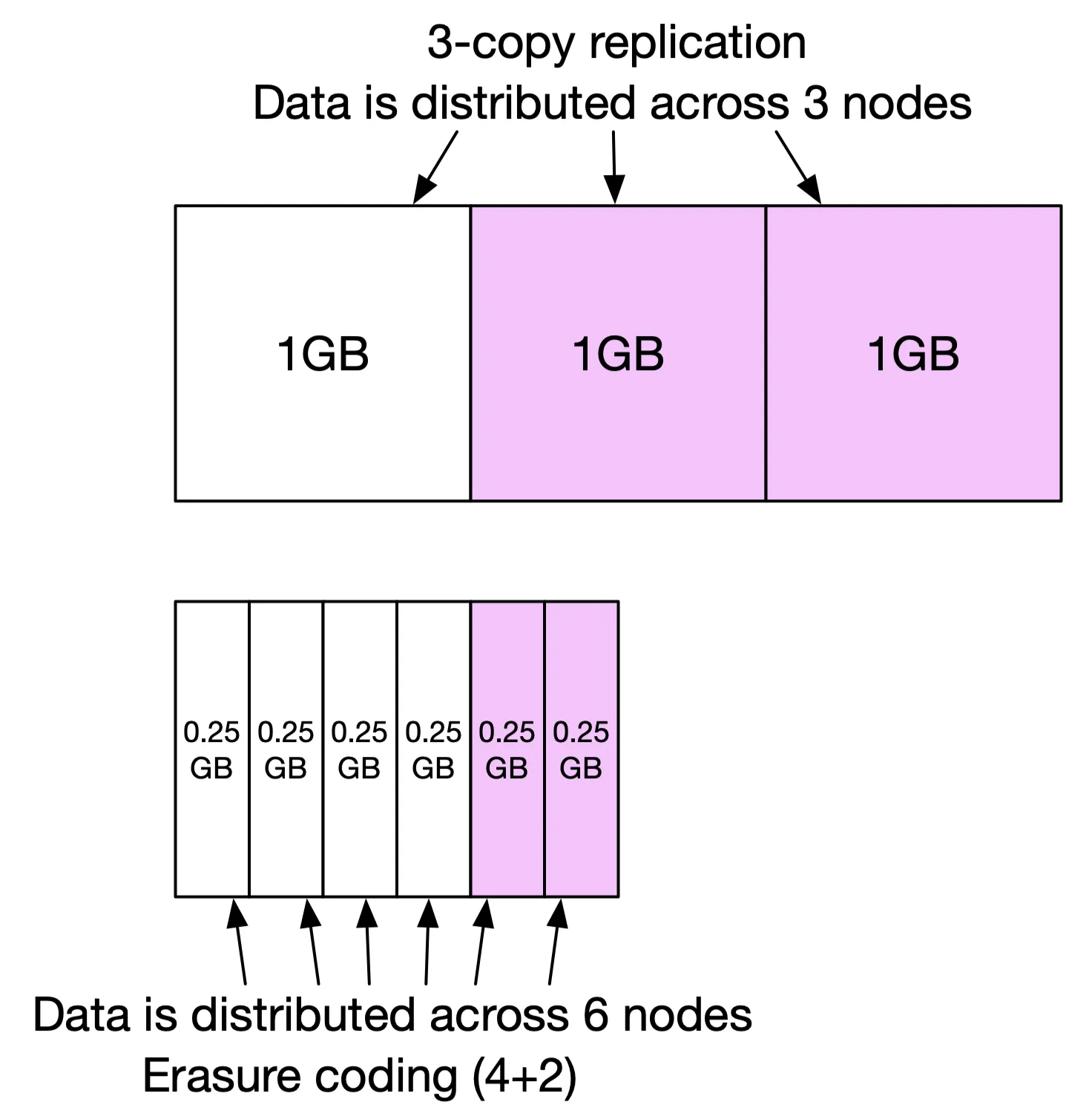
Figure 17: Extra space comparison
Durability from 0.81% AFR: erasure coding → 11 nines.
| Replication | Erasure Coding | |
|---|---|---|
| Durability | 6 nines (3 copies) | 11 nines (8+4) |
| Storage efficiency | 200% overhead | 50% overhead |
| Compute | None | Parity calculation |
| Write perf | Faster (no calculation) | Slower (parity calc) |
| Read perf | Single replica | Multiple nodes; slower under failure |
Replication: latency-sensitive apps. Erasure coding: cost efficiency, archival. This design focuses on replication.
Correctness verification (checksums):
In-memory data corruption is common at scale. Append a checksum (MD5) to each object + file-level checksum when marked read-only.


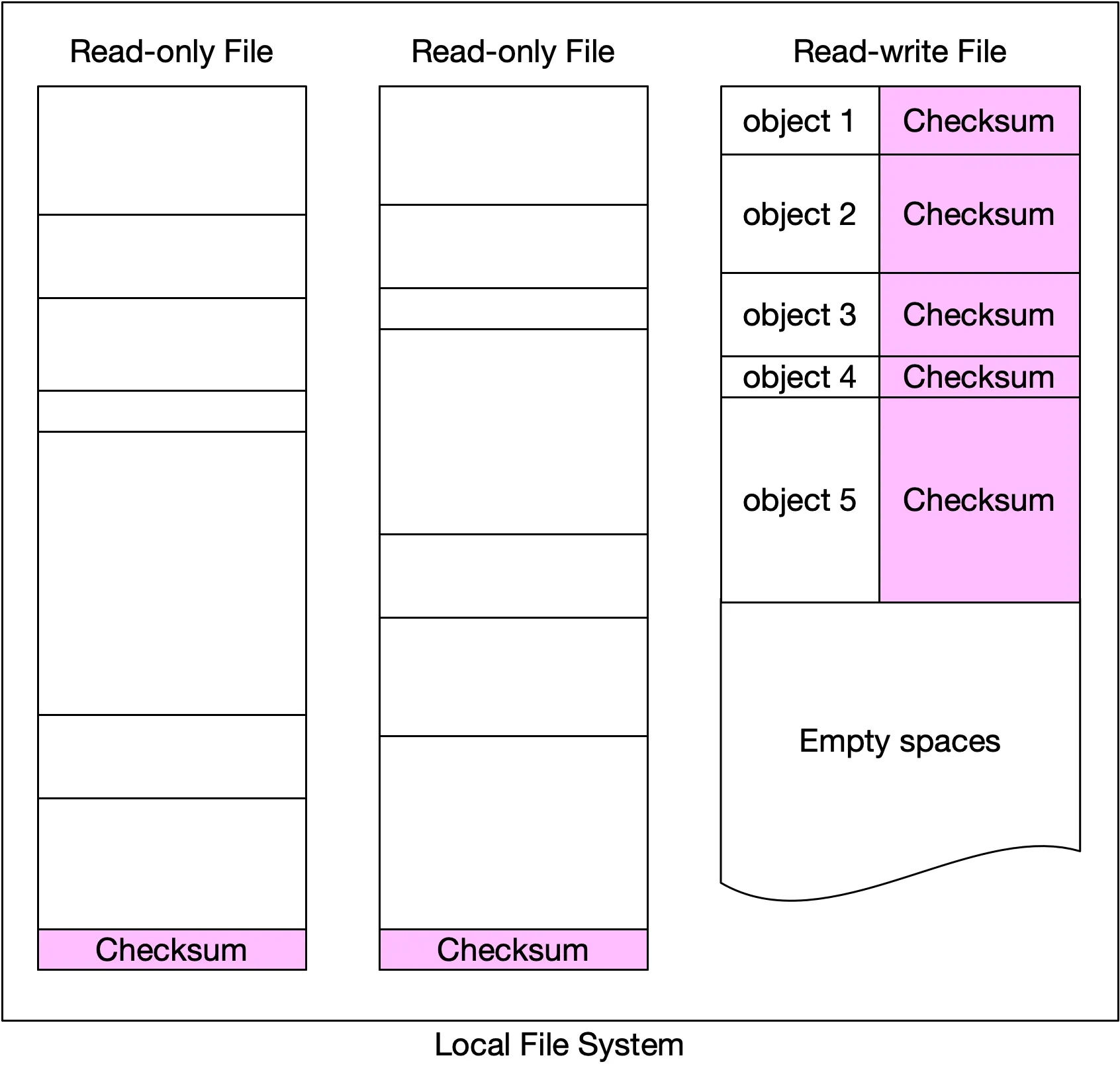
Figures 18-20: Checksum generation, comparison, data node layout
Read flow: fetch data + checksum → compute → mismatched? → try other failure domains → reconstruct from 8 valid pieces.
Metadata data model
Schema:
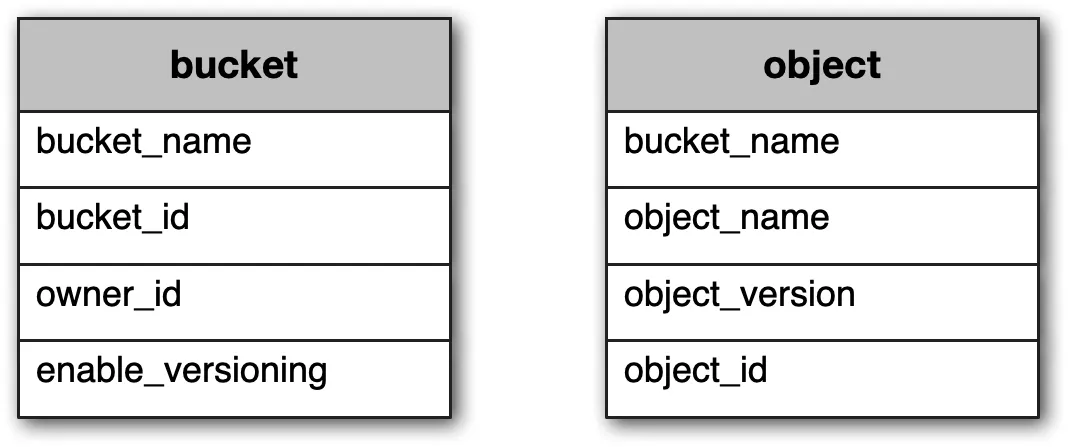
Figure 21: Database tables
Two tables: bucket (small, ~10GB for 1M users × 10 buckets × 1KB) and object.
- Scale bucket table: a single server fits. Spread reads via replicas
- Scale object table: shard by
hash(bucket_name, object_name): most operations are URI-based
Three queries supported:
- Find object ID by name
- Insert/delete object by name
- List objects in a bucket sharing a prefix
Listing objects in a bucket
Flat structure, organized by prefixes. Path: s3://mybucket/abc/d/e/f/file.txt → bucket: mybucket, object: abc/d/e/f/file.txt, prefix: abc/d/e/f/.
Three uses:
aws s3 list-buckets: list all user's bucketsaws s3 ls s3://mybucket/abc/: list at the same prefix level (rolls up deeper prefixes)aws s3 ls s3://mybucket/abc/ --recursive: all objects sharing a prefix
Single DB: SELECT * FROM object WHERE bucket_id = "123" AND object_name LIKE 'abc/%'
Sharded DB (distributed): query all shards → aggregate. Paging is complex: each shard returns different counts, offsets vary per shard, the cursor must track all offsets. Solution: denormalize listing data into a separate table sharded by bucket_id → isolates listing to a single DB. Acceptable trade-off (listing performance is rarely a priority).
Object versioning
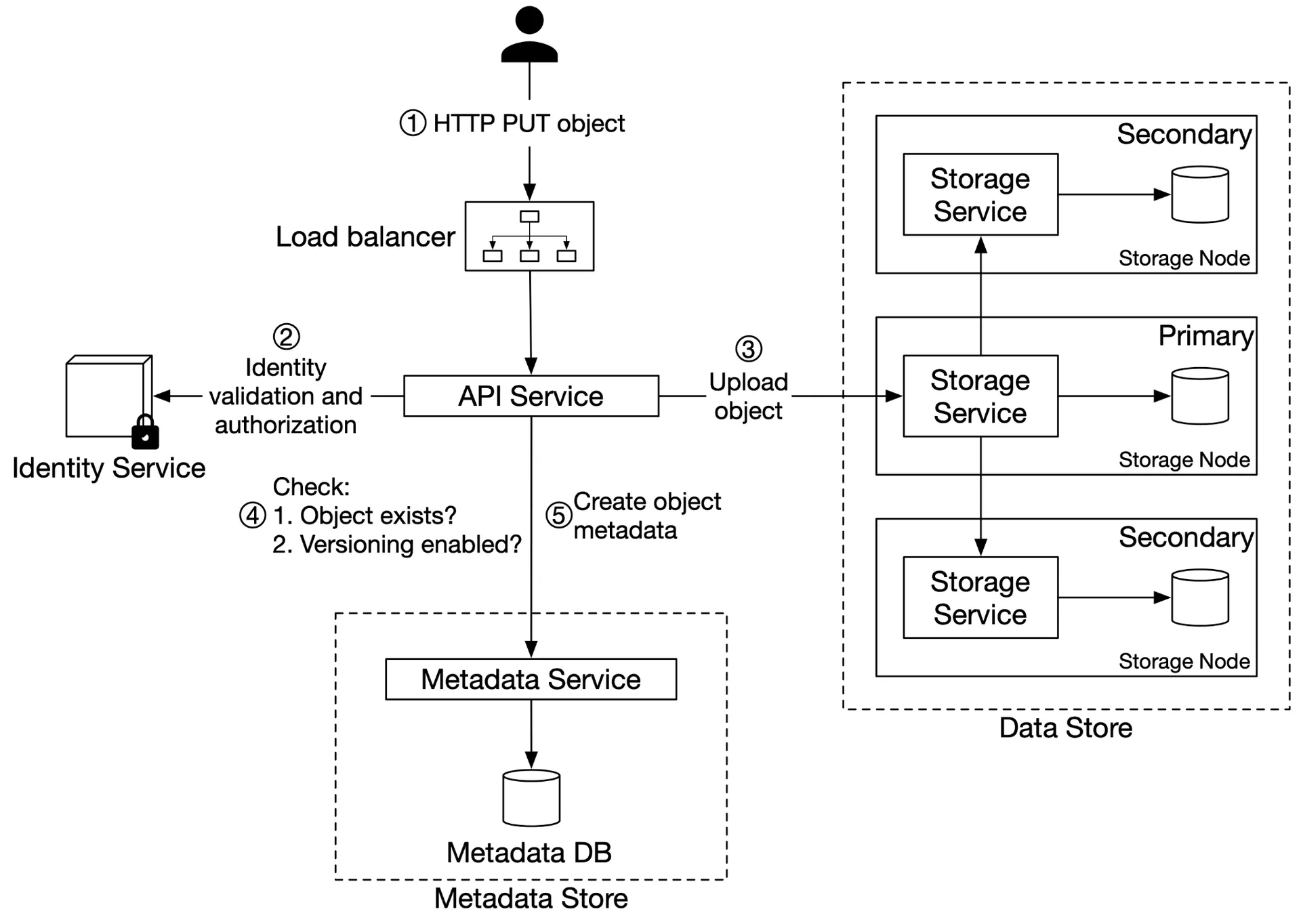
Figure 22: Object versioning
Upload flow for a versioned object: same as normal, but the metadata store inserts a new row (not overwrite) with the same bucket_id + object_name, new object_id (UUID) + object_version (TIMEUUID). Current version = largest TIMEUUID.
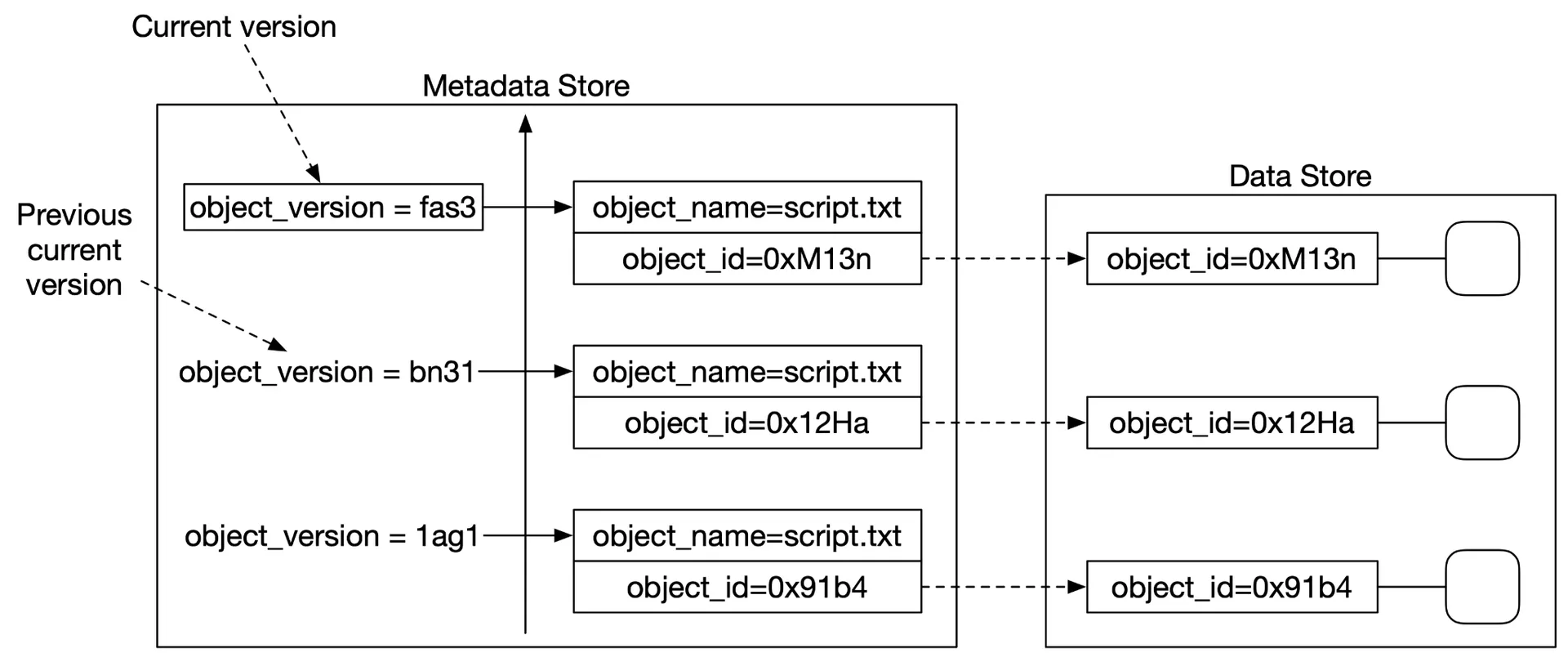
Figure 23: Versioned metadata
Deletion: all versions remain; insert a delete marker as a new version. GET on a delete marker → 404.
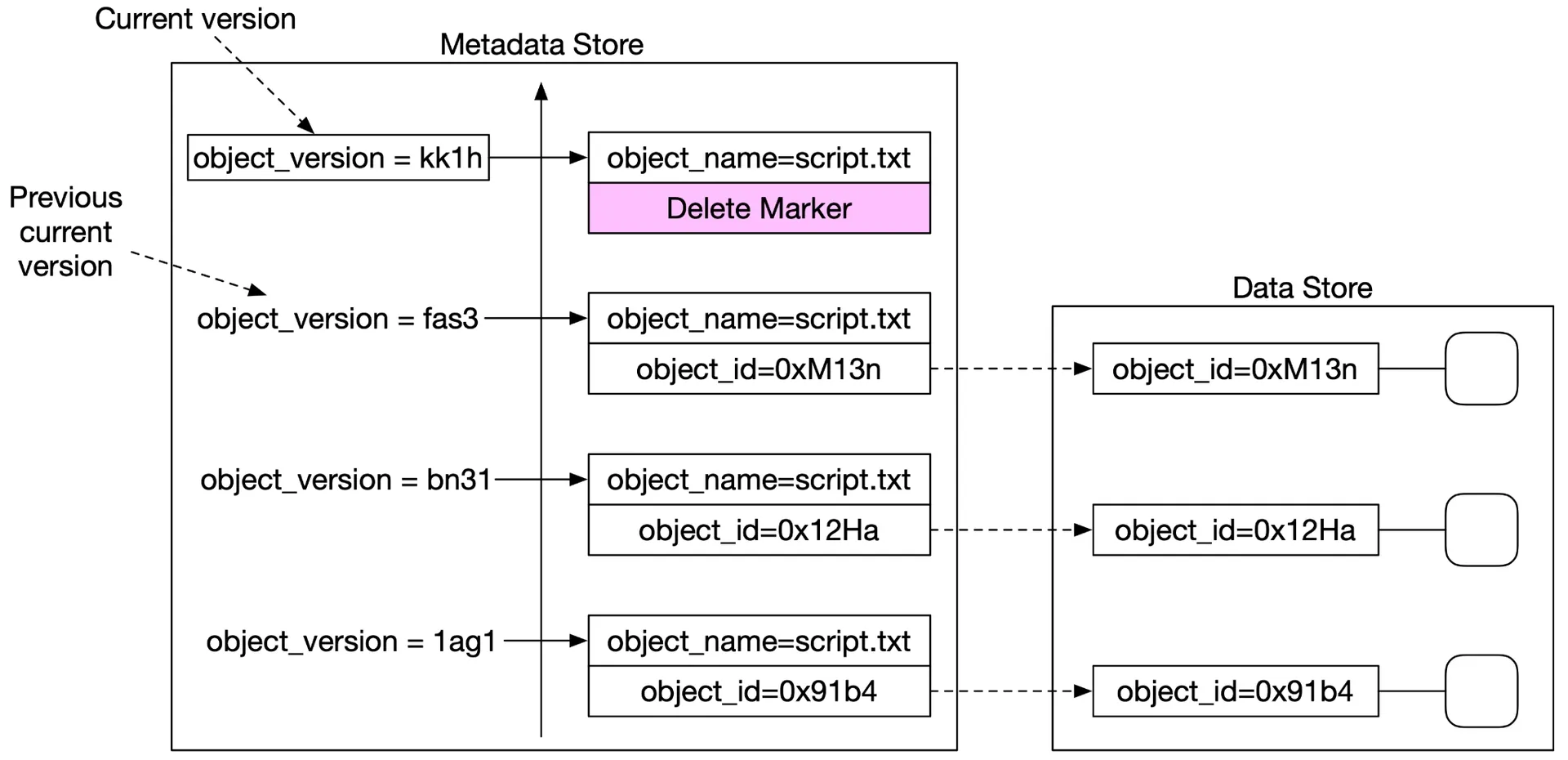
Figure 24: Delete with delete marker
Optimizing uploads of large files: Multipart upload
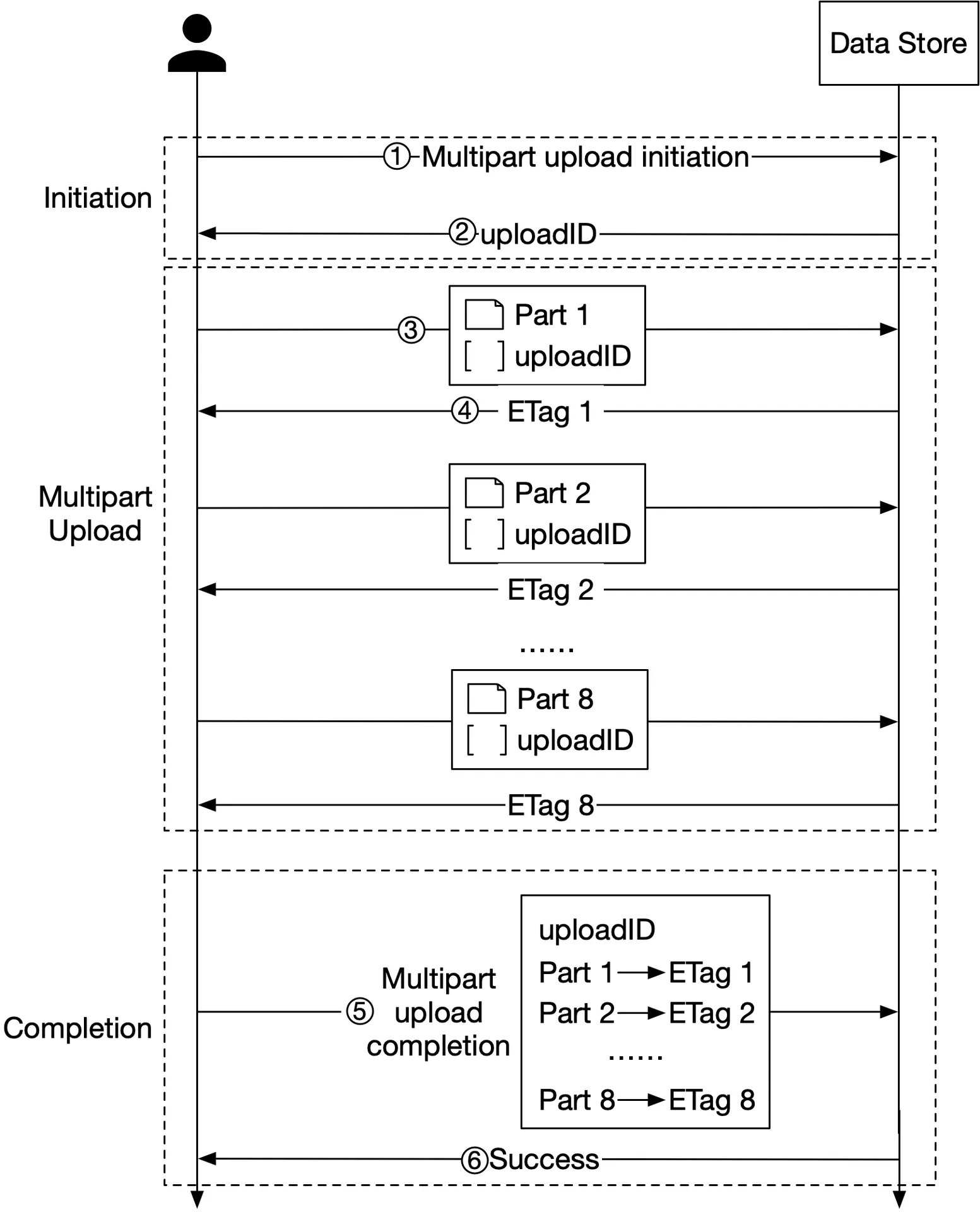
Figure 25: Multipart upload
- Initiate multipart upload → get
uploadID - Split the file into parts (e.g. 1.6GB → 8 × 200MB). Upload each part with
uploadID - Each part returns an
ETag(MD5 checksum) - Complete multipart upload: send
uploadID+ part numbers + ETags - Data store reassembles the object (may take minutes for large files)
Old parts after reassembly → garbage collected.
Garbage collection
Reclaims space from: lazy deletion (marked deleted), orphan data (half-uploaded/abandoned multipart), corrupted data (checksum failures).
Compaction: copy non-deleted objects from read-only files to a new file. Skip objects with delete_flag = true. Update the object_mapping table (file_name, start_offset). Wrap updates in a transaction.
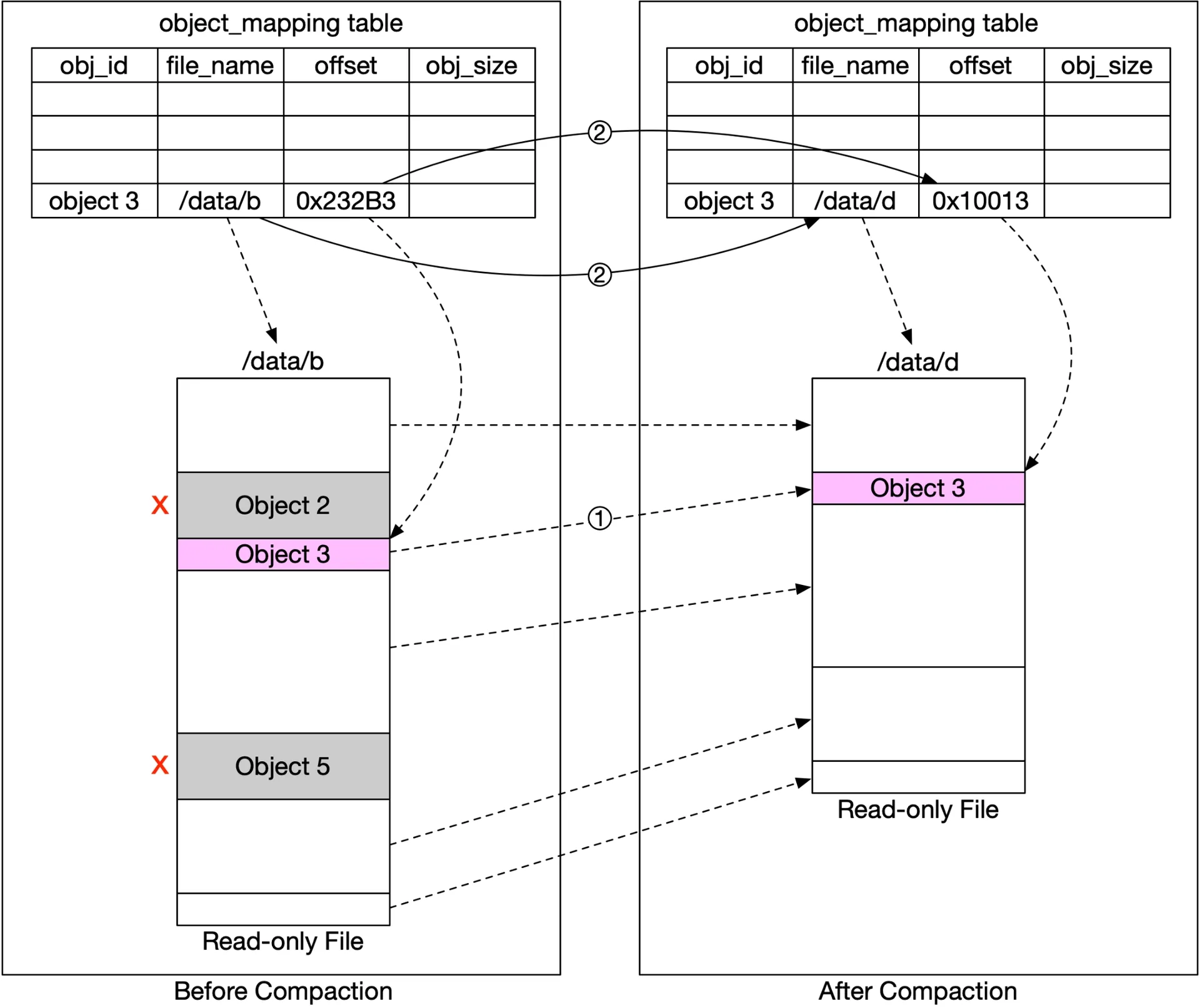
Figure 26: Compaction
Wait until many read-only files accumulate to compact → avoid creating many small files.
Step 4 of 4: Wrap up
What we designed:
- Storage taxonomy → high-level design (data store + metadata store separation)
- Data persistence (WAL-like merging, SQLite per node)
- Durability (replication vs erasure coding, checksums)
- Metadata sharding (hash of bucket+object name)
- Listing (denormalized table)
- Versioning (TIMEUUID + delete markers)
- Multipart upload
- Garbage collection (compaction)